It’s completely normal to be concerned about your privacy online — especially when the average connected adult now spends about 6 hours and 38 minutes a day on the internet, according to DataReportal’s Digital 2026 report.
- Do I Need A VPN?
- What’s Changed in 2026?
- How Does a VPN Work?
- HTTPS vs VPN: What’s the Difference?
- Common Scenarios — Do You Need a VPN?
- 1. Public Wi‑Fi & Travel
- 2. Home Privacy & ISP Tracking
- 3. Streaming & Geo‑Blocks
- 4. Remote Work / Business Access
- 5. Gaming & DDoS Protection
- 6. Online Shopping & Price Differences
- When a VPN Might Not Help
- 5‑Question Checklist: Decide in 30 Seconds
- Is a VPN Worth It in 2026, and How Do I Choose One?
- Speed & Protocols
- Logging Policy & Audits
- Security Essentials
- Price & Renewal Traps
- Free vs Paid
- Common Pitfalls to Avoid
- VPNs in Malaysia & Singapore: Legal Status and Local Realities
- Conclusion
- FAQ
At the same time, almost every website you visit today already uses HTTPS, which encrypts the connection between your browser and the site. So does the average person still need a VPN in 2026?
The honest answer: it depends on how you use the internet. Roughly 1.6 billion people worldwide — close to a third of all internet users — now use a VPN, but plenty of casual users genuinely don’t need one. This guide walks you through when a VPN is essential, when it’s pointless, and how to decide in 30 seconds.
Do I Need A VPN?
You should use a VPN if:
- You’re always on the go and connect to public Wi-Fi in cafés, airports, hotels, or co-working spaces
- You regularly hit region-blocked content, apps, or prices
- You don’t want your browsing habits profiled and sold to advertisers by your ISP
- You handle sensitive work and need a secure connection outside the office
- You’re a gamer worried about DDoS attacks, or you notice your ISP throttling your connection
- You travel frequently and want your banking, email, and messaging to work safely from anywhere
You may not need a VPN if:
- You mostly browse HTTPS websites on your own home Wi-Fi
- Geo-blocked content isn’t a concern for you
- You’re signed in to Google, Meta, or TikTok all day anyway — a VPN won’t hide you from platforms you’re logged in to
- You already use other privacy tools (privacy-focused browser, encrypted DNS, tracker blockers) and understand their limits
What’s Changed in 2026?
Three shifts are worth knowing before you decide:
- Age-verification laws are driving VPN adoption. When the UK’s Online Safety Act age checks kicked in from July 2025, VPN sign-ups surged — Proton VPN reported spikes of over 1,400% in UK sign-ups within hours. Similar age-assurance rules are spreading to other countries, including Malaysia’s social media age-limit enforcement in 2026 (more on the local angle below).
- Free VPNs got dramatically better — at the top end. Proton VPN’s free tier now offers unlimited data with no ads, something unthinkable a few years ago. But the gap between reputable free tiers and shady “100% free VPN” apps that log and sell your data has never been wider.
- Streaming services block VPNs more aggressively. Netflix, and most major platforms actively blacklist known VPN IP ranges, so unblocking works inconsistently and usually only with premium providers that rotate IPs.
How Does a VPN Work?
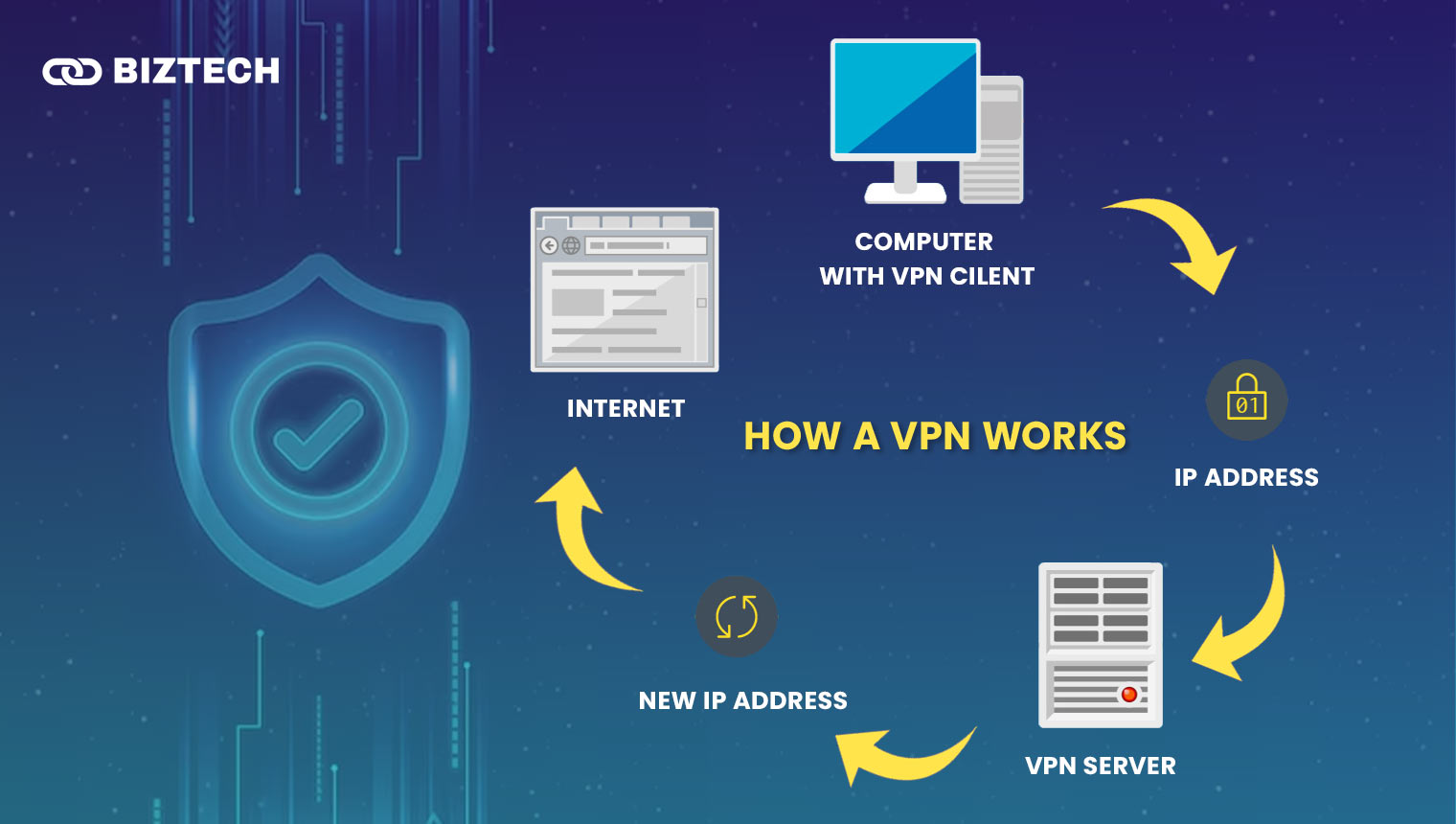
A VPN (virtual private network) creates a secure, encrypted tunnel between your device and a VPN server, and your traffic exits to the internet from that server. Websites see the VPN server’s IP address instead of yours, and anyone between you and the server — a Wi-Fi snoop, your ISP — sees only scrambled data.
If you break the name down:
- Virtual: no physical cables or dedicated lines are needed — the tunnel runs over your existing connection.
- Private: traffic inside the tunnel is encrypted, so others on the same network can’t read it.
- Network: your device and the VPN server form a linked network, wherever you are in the world.
Modern VPNs use protocols like WireGuard and OpenVPN; WireGuard in particular is why today’s VPNs feel much faster than the sluggish services of a few years ago.
[su_note note_color=”#ffffff” text_color=”#000000″ radius=”10″]Myth-buster: A VPN does not make you anonymous. If you’re signed in to Google, Netflix, or Facebook, those platforms still know exactly who you are — a VPN only changes where you appear to connect from.[/su_note]
HTTPS vs VPN: What’s the Difference?

Both HTTPS and a VPN protect you with encryption, but they cover different layers — and they work best together, not as substitutes.
| HTTPS | VPN | |
|---|---|---|
| What does it secure? | Only the content you exchange with each website | All internet traffic leaving your device — every app, not just the browser |
| Who does it hide data from? | Hackers on local networks/public Wi-Fi (content only) | Hackers, your ISP, network administrators, and some censorship |
| Does it hide which sites you visit? | No — your ISP still sees every domain you connect to | Yes — your ISP sees only an encrypted tunnel to the VPN server |
| Does it hide your IP address? | No, your IP is visible to every site | Yes, sites see the VPN server’s IP |
| Do you need to set it up? | No — automatic on almost all websites today | Yes — you choose, install, and pay for (or sign up to) a provider |
The short version: HTTPS protects what you send to a site; a VPN also hides which sites you visit and where you’re connecting from.
Common Scenarios — Do You Need a VPN?
1. Public Wi‑Fi & Travel
If you regularly use café, airport, hotel, or mall Wi-Fi, a VPN is strongly recommended.
Public networks are the classic weak point: rogue hotspots with copycat names, other users on the same unsecured network, and captive portals that downgrade security. HTTPS protects most of what you do, but a VPN closes the remaining gaps — DNS lookups, poorly configured apps, and anything that isn’t encrypted end-to-end.
[su_note note_color=”#ffffff” text_color=”#000000″ radius=”10″]✖ You might not need it if: you rarely use public Wi-Fi, or you tether to your own mobile data instead — which is safer than any free hotspot.[/su_note]
2. Home Privacy & ISP Tracking
Even on your home Wi-Fi, your internet service provider can see every domain you visit, when, and for how long. Depending on where you live, that data can be used for profiling or shared with advertisers.
A VPN hides your browsing destinations from your ISP. If “my ISP knowing my full browsing history” bothers you, that alone is a valid reason to run one at home.
[su_note note_color=”#ffffff” text_color=”#000000″ radius=”10″]✖ You might not need it if: you’re not concerned about ISP-level profiling, or you already use encrypted DNS and accept that your ISP still sees traffic volume and timing.[/su_note]
3. Streaming & Geo‑Blocks
A VPN can make you appear to be in another country, which is why it’s so popular for unlocking regional streaming catalogues or watching home content while travelling.
Be realistic, though: most streaming platforms actively block known VPN IP addresses, so free and budget VPNs frequently fail here. Only premium providers with large, frequently rotated server fleets unblock reliably — and even they have off days. Also check your streaming service’s terms: unblocking usually breaches them (your account can be restricted, though in practice enforcement is rare).
[su_note note_color=”#ffffff” text_color=”#000000″ radius=”10″]✖ You might not need it if: you’re happy with the content available in your region.[/su_note]
4. Remote Work / Business Access
If your company provides its own corporate VPN, use that for work — it’s built to reach internal tools and databases securely, and a personal VPN is not a substitute.
A personal VPN still helps if you’re a freelancer or small-business owner handling client data from cafés and co-working spaces, or if you travel and need your usual services to work securely from hotel networks.
[su_note note_color=”#ffffff” text_color=”#000000″ radius=”10″]✖ You might not need it if: your employer already tunnels your work traffic, and your personal browsing happens at home on HTTPS sites.[/su_note]
5. Gaming & DDoS Protection
For competitive gamers, a VPN hides your real IP address, which protects against DDoS attacks — a malicious flood of traffic aimed at knocking you offline mid-match. It can also help if your ISP throttles gaming or streaming traffic at peak hours.
The trade-off is latency: routing through a VPN server adds some ping, so pick a provider with servers near your game’s region. Not every VPN is built for gaming — see our guide to the best VPNs for gaming.
[su_note note_color=”#ffffff” text_color=”#000000″ radius=”10″]✖ You might not need a VPN if: you play casually on home Wi-Fi and nobody has a reason to target your connection.[/su_note]
6. Online Shopping & Price Differences
Flights, hotels, subscriptions, and software are sometimes priced differently by region. Some users switch VPN locations to compare prices before buying.
It works occasionally, but don’t count on it: many merchants price by your billing address and payment card country, not your IP. Treat any savings as a bonus, not a reason to subscribe.
[su_note note_color=”#ffffff” text_color=”#000000″ radius=”10″]✖ You might not need it if: you mostly buy from local platforms that price in your own currency anyway.[/su_note]
When a VPN Might Not Help
A VPN is one privacy tool, not a force field. It will not help when:
- You’re browsing HTTPS sites on trusted home Wi-Fi — the marginal benefit is small
- You stay logged in to Google, Meta, TikTok, or Shopee — those platforms track your account activity regardless of your IP
- Tracking cookies and browser fingerprinting follow you — a VPN doesn’t block either; you need browser-level protections for that
- You download malware or click a phishing link — a VPN is not an antivirus and won’t stop a scam page from stealing your password
- You expect legal cover — using a VPN for illegal activity is still illegal, and reputable providers cooperate with valid court orders
One more distinction worth knowing: a proxy only reroutes traffic for a specific app or browser and usually doesn’t encrypt it, while a VPN encrypts everything at the device level. If you’ve seen proxies marketed for social media management, that’s a different tool for a different job — see our guide to Instagram proxies for how they compare.
5‑Question Checklist: Decide in 30 Seconds
Still wondering, “Do I need a VPN?” Count how many of these you answer yes to:
- Do I connect to public Wi-Fi at least a few times a month?
- Does it bother me that my ISP can see and profile every site I visit?
- Do I regularly want content, apps, or catalogues blocked in my region?
- Is my work sensitive enough that a snooped connection would be a real problem?
- Do I game competitively, torrent, or otherwise have a reason someone might target my IP?
Your score:
- 4–5 yes: Get a VPN — a paid one, running on all your devices.
- 2–3 yes: Worth having one; a reputable free tier may cover you for occasional use.
- 0–1 yes: You can probably skip it. Spend the money on a password manager instead — for most casual users it prevents far more real-world harm.
| Your profile | Do you need a VPN? | What to get |
|---|---|---|
| Frequent traveller / digital nomad | Yes — essential | Paid VPN with servers in your home country and wherever you roam |
| Remote or hybrid worker | Usually — if no corporate VPN | Paid VPN with a kill switch; use your company VPN for work systems |
| Streaming fan chasing other catalogues | Only a premium VPN works reliably | Top-tier paid provider; expect occasional blocks anyway |
| Competitive gamer | Helpful for DDoS protection | Paid VPN with nearby low-ping servers |
| Privacy-conscious home user | Nice to have | Reputable free tier (e.g. unlimited-data free plans) or budget annual plan |
| Casual browser on home Wi-Fi | Probably not | Password manager + updated browser first |
Is a VPN Worth It in 2026, and How Do I Choose One?
A quick search will surface dozens of VPNs that all claim to be the fastest and most private. Quality varies enormously. Here’s what actually matters when comparing the best VPN services:
Speed & Protocols
Look for WireGuard support (or the provider’s WireGuard-based protocol) and a large server network near you — for Malaysia and Singapore users, that means servers in Singapore, Malaysia, and the wider Asia-Pacific. Unlimited bandwidth should be standard on any paid plan.
Logging Policy & Audits
“No-logs” claims are marketing until independently verified. Prefer providers whose no-logs policies have been audited by third-party firms (several major providers now do this annually) and, ideally, that run RAM-only servers so nothing persists on disk.
Security Essentials
A kill switch (cuts internet if the VPN drops), DNS-leak protection, and modern encryption are non-negotiable. Nice-to-haves in 2026 include multi-hop routing and ad/tracker blocking built in.
Price & Renewal Traps
Headline prices are almost always introductory. A “$2.99/month” two-year deal frequently renews at three or four times that. Check the renewal price before you commit, and set a calendar reminder before auto-renewal hits.
Free vs Paid
Reputable free tiers are now genuinely usable — Proton VPN’s free plan offers unlimited data, and several others give 2–10GB monthly. They’re fine for occasional public-Wi-Fi protection. Paid plans add speed, server choice, streaming support, and multi-device coverage. Whatever you do, avoid unknown “100% free unlimited VPN” apps in the app stores: many log and monetise exactly the data you’re trying to protect. Start with our tested free VPN picks instead.
Common Pitfalls to Avoid
- Believing “anonymous” marketing. A VPN shifts trust from your ISP to the VPN provider — choose one worth trusting.
- Shady free apps. If a free VPN has no visible business model, you are the product. Stick to free tiers from audited, paid providers.
- Lifetime deals. A “lifetime VPN” for $30 rarely survives — running servers costs money forever. Treat these as red flags.
- Forgetting the kill switch. Without it, your real IP leaks the moment the VPN connection drops.
- Using a VPN for banking abroad without warning your bank. Sudden country hopping can trigger fraud locks; some banking apps block VPN connections outright. If your banking app misbehaves, disconnect the VPN for that session — the app itself is already encrypted.
VPNs in Malaysia & Singapore: Legal Status and Local Realities
For readers here at home, the good news first: using a VPN is legal in both Malaysia and Singapore.
- Malaysia: MCMC has confirmed VPN use is not against the law. In July 2026 the government announced moves with MCMC to curb VPN misuse — specifically using VPNs or third-party identities to dodge the new social media age-limit rules. Misusing a VPN for scams, pornography distribution, or other offences can be prosecuted under the Penal Code, the Computer Crimes Act 1997, and the Communications and Multimedia Act 1998 — but ordinary privacy-minded use remains legal.
- Singapore: VPNs are legal for personal and business use; illegal activity stays illegal with or without one. Singapore’s own GovTech has published explainers on how VPNs protect users on public Wi-Fi.
- Pricing note: most VPNs bill in USD, so factor in FX rates plus Malaysia’s 8% SST or Singapore’s 9% GST where applied. Some providers offer local-currency pricing at checkout.
- Local use cases: securing café and mall Wi-Fi in KL, Penang, or Singapore; keeping Malaysian/Singaporean banking, Astro/sooka, or meWATCH access while travelling abroad (connect to a home-country server); and reducing throttling on peak-hour streaming.
Conclusion
So, do you actually need a VPN? If you travel, use public Wi-Fi, care about ISP profiling, or game competitively — yes, and a paid, audited provider is worth the few ringgit or dollars a month. If you’re a casual user on home Wi-Fi visiting mainstream HTTPS sites, you can reasonably skip it.
Either way, a VPN is only one layer. Strong unique passwords (use a password manager), software updates, two-factor authentication, and healthy scepticism about links and downloads will protect you from far more everyday threats than any VPN can.
Details verified July 2026 from official provider and regulator sources; VPN features, prices, and local regulations change often — confirm with the provider before subscribing.
FAQ
Disclaimer: This article is for general information only and is not security or legal advice. KayaToday is not affiliated with any VPN provider mentioned. Verify features, pricing, and local regulations with official sources before purchasing. Sources: DataReportal Digital 2026, TechRadar on Malaysia’s VPN rules, GovTech Singapore.