Your smart devices make life easier, but they also come with risks. Cybercriminals can target your connected devices, from smart TVs to security cameras, stealing data or even taking control. This leaves your personal information exposed and open to attacks. You risk losing your privacy, money, and safety without proper security.
- What’s Changed for IoT Security in 2026
- IoT Cybersecurity: Definition and Importance
- Components of Your IoT (Internet of Things)
- Your IoT (Internet of Things) is Not Fully Safe
- Common Threats to Your IoT
- Device Hijacking
- Data Interception
- Man-in-the-Middle Attacks
- Malware & Ransomware
- Denial-of-Service (DoS)
- Insecure APIs
- Weak Passwords
- Lack of Updates
- Physical Tampering
- 5 Ways IoT Cybersecurity Eliminates (or Prevents) These Threats
- 1. Strong Encryption
- 2. Regular Software Updates & Patch Management
- 3. Strong Authentication Methods
- 4. Network Segmentation
- 5. Secure APIs and Device Interfaces
- Simple Practices You Can Do To Enhance Your IoT Cybersecurity
- Change Default Passwords
- Disable Unnecessary Features
- Use a Guest Network for IoT Devices
- Limit IoT Device Connectivity
- Monitor Your IoT Devices Regularly
- How to Choose a Secure Smart Device: A Simple Framework
- Worked Example: Buying a Smart Home Camera in Malaysia
- Common Pitfalls to Avoid
- Security Labels: How to Tell if a Smart Device Is Safe (2026)
- Frequently Asked Questions (FAQs)
But there’s a way to protect yourself. IoT cybersecurity helps keep your devices safe from threats. It protects your data and blocks cyberattacks before they happen. In this guide, we explain how it works, the biggest threats in 2026, the practical steps you can take at home, and the new security labels (in Singapore, the US, and the EU) that now tell you which devices are actually safe to buy.
What’s Changed for IoT Security in 2026
IoT is no longer a niche — it is the default. By the end of 2025 there were roughly 21.1 billion active IoT devices worldwide, up about 14% year on year, with the installed base forecast to reach around 39 billion by 2030. More devices means a bigger attack surface, and attackers have noticed.
Here is what the current data shows:
| 2026 IoT Security Snapshot | What It Means For You |
| ~820,000 IoT attacks are attempted every day; automated scans hit exposed devices within minutes of them going online. | A brand-new smart camera or router can be probed almost as soon as you plug it in — security has to be set up on day one. |
| Roughly 1 in 3 data breaches now involves an IoT device. | Your smart doorbell or TV can be the weak link that exposes your whole home network. |
| Over 75% of IoT attacks target routers, which also carry more than half of the most critical device vulnerabilities. | Your router is the single most important device to secure — not your fridge or lightbulb. |
| Nokia reported a roughly fivefold jump in malicious IoT botnet activity in the last year (compromised devices climbing from about 200,000 to 1 million), and Cloudflare blocked a record 29.7 Tbps DDoS attack from a single IoT botnet in late 2025. | Insecure home devices are quietly recruited into botnets that attack others — securing yours protects you and the wider internet. |
| Around 98% of IoT device traffic is still sent unencrypted. | Unless you take action, much of what your devices send can be read if intercepted. |
The other big shift in 2026 is that governments have stopped leaving IoT security to chance. Singapore, the US, and the EU have all rolled out labelling or legal requirements (covered in the section on security labels below) so you can now check a device’s security before you buy it. Figures verified August 2026 from industry reports; always confirm the latest numbers with the source, as they are updated frequently.
IoT Cybersecurity: Definition and Importance
IoT cybersecurity protects internet-connected devices like smart homes, industrial tools, and healthcare systems from cyber threats. It is important because a single hack can crash the network and give a hacker full control of the system.
Cybersecurity is important for the Internet of Things (IoT) because many devices we use, like smart thermostats or fitness trackers, are connected to the internet.
These devices collect and share personal information. Hackers can break into these devices, steal data, or even control them if not properly protected.
Strong cybersecurity helps keep our devices and personal information safe from such threats.
This risk is incredibly high in defense and military operations, where IoT devices store highly sensitive information. A weak network point or an unprotected device can allow hackers to access critical intelligence or even cause physical damage to the entire network.
The risks have increased with governments, healthcare systems, and businesses’ dependence on IoT for connectivity and efficiency. In Malaysia, the Cyber Security Act 2024 (in force since 26 August 2024, overseen by the National Cyber Security Agency, NACSA) now sets baseline security and incident-reporting duties for operators of critical infrastructure — a sign of how seriously connected-device risk is being taken regionally.
Each new device connected to a network adds another entry point for hackers. In the wrong hands, stolen data can lead to severe damage, especially in defense logistics or national security.
Components of Your IoT (Internet of Things)
Knowing its main components is important to fully understand the Internet of Things (IoT). Each component has a unique role in making IoT devices function properly. Here’s a breakdown:
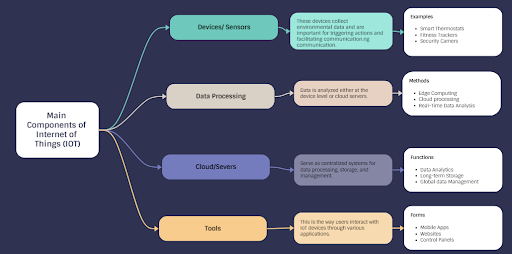
1. Devices/Sensors
These are the “things” in IoT. Devices and sensors gather environmental information, such as temperature, motion, humidity, and light.
Smart thermostats, fitness trackers, and security cameras are examples of such devices. The data they gather is essential for triggering actions or sending information to other devices or systems.
2. Connectivity
This component connects devices to the internet. Connectivity allows devices to send and receive data and enables real-time communication with remote control.
For example, connectivity could be done using Wi-Fi, networks, Bluetooth, or other protocols.
3. Data Processing/Edge Computing
When gathered in one place, data frequently needs to be processed. Data processing happens at the device level (edge computing) or through a cloud server. This is where the information gets analyzed, and decisions are made.
For example, a smart thermostat might adjust room temperature based on real-time data about your home’s climate.
4. Cloud/Servers
Most data processing and storage happen in the cloud or on servers. Data is transferred to centralized systems for in-depth analysis or long-term storage, enabling large-scale data management, analytics, and insights.
For example, cloud systems can store data from thousands of IoT devices across the globe.
5. User Interface/Applications
This is how you interact with IoT devices. It can be a mobile app, website, or control panel that lets you manage and monitor your devices.
The user interface is how you control the IoT ecosystem, whether adjusting a smart home system, reviewing your fitness data, or maintaining security cameras.
For example, user interfaces for IoT devices include mobile apps like Nest for controlling smart thermostats, Fitbit for tracking fitness data, and websites like Ring for managing security cameras. These apps and sites allow users to monitor and adjust settings for their connected devices, making interacting with IoT technology simple and convenient.
Your IoT (Internet of Things) is Not Fully Safe
Common Threats to Your IoT
| Threats | Description |
| Device Hijacking | Hackers gain unauthorized control over IoT devices, often for malicious purposes. |
| Data Interception | Sensitive data is intercepted while being transmitted between devices and networks. |
| Man-in-the-Middle Attacks | Attackers have the ability to read and change communications between IoT devices and servers. |
| Malware & Ransomware | Malicious software is installed on IoT devices to disrupt functionality or demand ransom. |
| Denial-of-Service (DoS) | Attackers overload devices or networks, making them unavailable to users. |
| Insecure APIs | Hackers can gain access to IoT systems or data by exploiting poorly secured APIs. |
| Weak Passwords | Passwords of IoT devices are easy to guess. |
| Lack of Updates | IoT devices that are not updated are open to hacking attacks. |
| Physical Tampering | Attackers manipulate physical devices to gain access to sensitive data or systems. |
Device Hijacking
Attackers gain control over IoT devices to use them for botnets, spying, or launching attacks on other systems. These hijacked devices can also be used for unauthorized actions. This is exactly how the record-breaking botnets of 2025–2026 were built — from ordinary home cameras and routers whose owners never realised they had been taken over.
Data Interception
Since many IoT devices transmit data wirelessly, hackers can intercept this information, especially if it’s not encrypted, leading to potential data theft or misuse. With roughly 98% of IoT traffic still unencrypted, this remains one of the most common real-world weaknesses.
Man-in-the-Middle Attacks
In this attack, the hacker intercepts communications between two devices, allowing them to read or edit messages being sent, which could cause misinformation or unauthorized access.
Malware & Ransomware
IoT devices can become infected with malicious software that disrupts normal operations or locks the device until a ransom is paid to the attacker.
Denial-of-Service (DoS)
By flooding IoT devices or networks with excessive traffic, attackers can cause a disruption, making the devices or services unavailable to legitimate users. Compromised IoT devices are frequently chained together into botnets that launch these attacks at massive scale.
Insecure APIs
Many IoT devices depend on APIs to connect with other services. If APIs are not properly secured, they become open to hacking attacks that could reveal sensitive data or take control of the devices.
Weak Passwords
Most of the IoT devices have default or weak passwords that hackers can easily guess. It allows them to gain unauthorized access to the device and its data.
Lack of Updates
Outdated devices frequently lack critical security patches, making them easy targets for hackers who misuse known errors.
Physical Tampering
Hackers can physically tamper with IoT devices to steal information directly from them or bypass security measures to gain network access.
5 Ways IoT Cybersecurity Eliminates (or Prevents) These Threats
1. Strong Encryption
Strong encryption involves converting data into a secure format that prevents unauthorized individuals from accessing it.
IoT devices can use encryption to protect data transmitted across networks, making it unreadable to hackers. To implement it, ensure all communications between IoT devices and their servers are encrypted with strong encryption algorithms such as AES.
Threats Prevented:
- Data Interception
- Man-in-the-Middle Attacks
- Device Hijacking
2. Regular Software Updates & Patch Management
Software updates and patches address known errors and reduce the risk of being used by hackers.
Regular updates are required to ensure the security of IoT devices and systems. Implement automated updates or use a device management platform to update all devices consistently.
Threats Prevented:
- Lack of Updates
- Malware & Ransomware
- Device Hijacking
3. Strong Authentication Methods
Multi-factor authentication (MFA) is one of the best robust authentication methods.
MFA is a security process requiring users to provide two or more verification factors to gain access to an account or system. It increases security by combining something you know (password), something you have (mobile device), and something you are (fingerprint).
It provides an additional layer of security. Instead of just passwords, IoT devices and systems may request further verification, such as a code sent to your phone or a fingerprint scan. This makes unauthorized access much more challenging.
Threats Prevented:
- Weak Passwords
- Device Hijacking
- Insecure APIs
4. Network Segmentation
Network segmentation is dividing your network into smaller and specialized parts to prevent attacks from spreading.
For example, you can separate IoT devices from critical systems and the broader network. This restricts access to sensitive data, lowering the likelihood of large-scale breaches.
Threats Prevented:
- Denial-of-Service (DoS)
- Malware & Ransomware
- Physical Tampering
5. Secure APIs and Device Interfaces
Only approved users and services can access IoT devices through secure APIs and device interfaces.
Strong authentication, encryption, and secure coding practices for APIs prevent unauthorized access to IoT systems and the data they generate.
Threats Prevented:
- Insecure APIs
- Device Hijacking
- Data Interception
Simple Practices You Can Do To Enhance Your IoT Cybersecurity
Change Default Passwords
One of the simplest yet most effective ways to improve IoT security is by changing devices’ default passwords.
Many IoT devices, such as cameras or smart thermostats, come with publicly known default passwords that are easy to guess. Changing these to strong, unique passwords ensures unauthorized users cannot quickly gain access.
How to Implement:
- Check your IoT device’s user manual or settings for the default login information.
- Try to replace the default password with a strong one that uses a random combination of alphabetical letters, numbers, and symbols.
- Use a password manager to keep track of these passwords securely.
Disable Unnecessary Features
Many IoT devices, such as remote access or certain communication channels, have features you might never use. Disabling unnecessary features reduces the attack surface and limits how hackers can access your device.
How to Implement:
- Review your device’s settings and disable features like remote control, voice commands, or unused Wi-Fi networks.
- Turn off Bluetooth, GPS, or other services that aren’t needed for your device to function.
Use a Guest Network for IoT Devices
IoT devices can introduce security risks to your main home or office network. Place these devices on a separate guest network to prevent them from accessing sensitive data or other devices on your primary network. Given that routers and other IoT gear now sit at the centre of most attacks, this single step does a lot of the heavy lifting.
How to Implement:
- Create a guest Wi-Fi network on your router just for IoT devices.
- Keep this network separate from your main devices and data storage.
- Ensure the guest network has a strong password and that it’s encrypted.
Limit IoT Device Connectivity
The fewer connections your IoT devices make, the less likely they are to be hacked. Limiting their connections to only what’s necessary helps reduce potential risks.
How to Implement:
- Avoid connecting devices to the internet when not needed.
- Disconnect devices from your network when they are not in use, especially if they can access sensitive data.
Monitor Your IoT Devices Regularly
Regularly checking your IoT devices for unusual activity helps you detect potential security threats early. This can include monitoring device status, checking for firmware updates, or reviewing connected devices.
How to Implement:
- Check the app or software associated with your IoT device for any alerts or updates.
- Check connected devices and permissions regularly to ensure that only trusted devices can access them.
How to Choose a Secure Smart Device: A Simple Framework
Prevention is easier than clean-up. Before you buy any connected device, run it through these five checks — roughly in order of importance:
- Does it carry a security label? A Singapore CLS, US Cyber Trust Mark, or equivalent label means an independent body has checked the basics. When two devices are similar, the labelled one is the safer buy.
- How long will it get security updates? Look for a stated support period. A cheap camera that stops getting patches in a year is a liability; a device with several years of guaranteed updates is worth paying a little more for.
- Can you set your own password and turn on MFA? Avoid anything that forces a fixed or shared default password, or that has no way to add a second verification step.
- Is the data encrypted? Check that the app and device use encrypted connections (the maker’s security page or FAQ should say so). Remember, most IoT traffic is not encrypted by default.
- Do you actually need it online? If a device’s value doesn’t depend on cloud features, a “local-only” option removes an entire category of risk.
Worked Example: Buying a Smart Home Camera in Malaysia
Say you have a budget of about RM250 for an indoor security camera. Two models are on the shelf at similar prices. Model A is an unbranded import with no listed update policy and a default password printed on the box. Model B is from an established brand, ships with a mandatory password setup, supports two-factor login through its app, and carries a Singapore CLS label.
Model A looks like the same camera for a few ringgit less — but it ticks the exact boxes that get devices hijacked into botnets. Model B costs marginally more and passes four of the five checks above. For a device that literally watches inside your home, Model B is the clear choice. The lesson: with IoT, the cheapest sticker price is rarely the cheapest device once security is factored in.
Common Pitfalls to Avoid
- Leaving the router untouched. It is the number-one target — change its admin password, keep its firmware updated, and enable WPA3 if available.
- Reusing one password everywhere. One leaked password then unlocks many devices. Use a password manager and unique passwords.
- “Set and forget.” Devices need updates for years, not just on day one. Turn on automatic updates where possible.
- Ignoring end-of-support notices. A device that no longer receives patches should be replaced or taken offline.
- Buying purely on price. The unlabelled bargain often lacks the encryption and update commitments that keep you safe.
Security Labels: How to Tell if a Smart Device Is Safe (2026)
The most consumer-friendly change in recent years is that you no longer have to guess whether a device is secure — several governments now run labelling schemes. Here is where the main ones stand in 2026:
| Scheme | Region | 2026 Status |
| Cybersecurity Labelling Scheme – CLS(IoT) | Singapore | Live and the most mature in Asia-Pacific. Around 500+ products registered by early 2026 (IP cameras, routers, mesh systems and more). At least Level 1 certification is mandatory for home Wi-Fi routers, and Singapore signed a mutual-recognition arrangement with Japan’s JC-STAR scheme effective 1 June 2026. |
| U.S. Cyber Trust Mark | United States | Rolling out. The ioXt Alliance was named the program’s Lead Administrator in April 2026, with product applications expected to open once setup completes. From 4 January 2027, vendors supplying consumer IoT to the US government must carry the mark. |
| EU Cyber Resilience Act (CRA) | European Union | A law rather than a label. Vulnerability-reporting duties take effect on 11 September 2026, and full “secure-by-design” compliance is mandatory for products placed on the EU market from 11 December 2027. |
| Cyber Security Act 2024 (NACSA) | Malaysia | In force since August 2024. It focuses on critical national infrastructure rather than a consumer device label, but it signals stronger regional attention to connected-device risk. |
For shoppers in Malaysia and Singapore, the practical takeaway is simple: a Singapore CLS label is the easiest at-a-glance signal that a smart device meets a real security baseline, and many of the same labelled products are sold across the region. When you’re weighing similar devices, let the label break the tie. If you’re also thinking about how your personal data is handled by these devices, our guides on decentralized digital identity and synthetic data and privacy are worth a read, as is our comparison of Android vs iOS for choosing the phone that anchors your smart home.
Frequently Asked Questions (FAQs)
This article is for general information only and was verified in August 2026 by KayaToday. Device features, prices, and regulations change frequently — always confirm the current details with the manufacturer or the relevant authority before making a purchase or security decision.