Stay connected with KayaToday—follow us on Instagram and Facebook for the latest news and reviews delivered straight to you.
- What “Ghibli-Style” AI Art Actually Is
- The Best Free AI Tools for Ghibli-Style Art in 2026
- 1. ChatGPT (GPT-4o / GPT Image) — where the trend started
- 2. Google Gemini (Nano Banana) — the strongest free challenger
- 3. Fotor Studio Ghibli Filter — one-click, no prompting
- 4. Dedicated web Ghibli generators (Pixelbin, insMind, getimg.ai)
- 5. Grok (Aurora) — no longer a free option
- Also worth a look
- Free Ghibli AI Tools Compared (2026)
- How to Choose the Right Tool
- How to Get a Result That Actually Looks Ghibli
- Common Pitfalls to Avoid
- The Copyright and Ethics Debate
- Ghibli-Style AI in Malaysia & Singapore
- Frequently Asked Questions
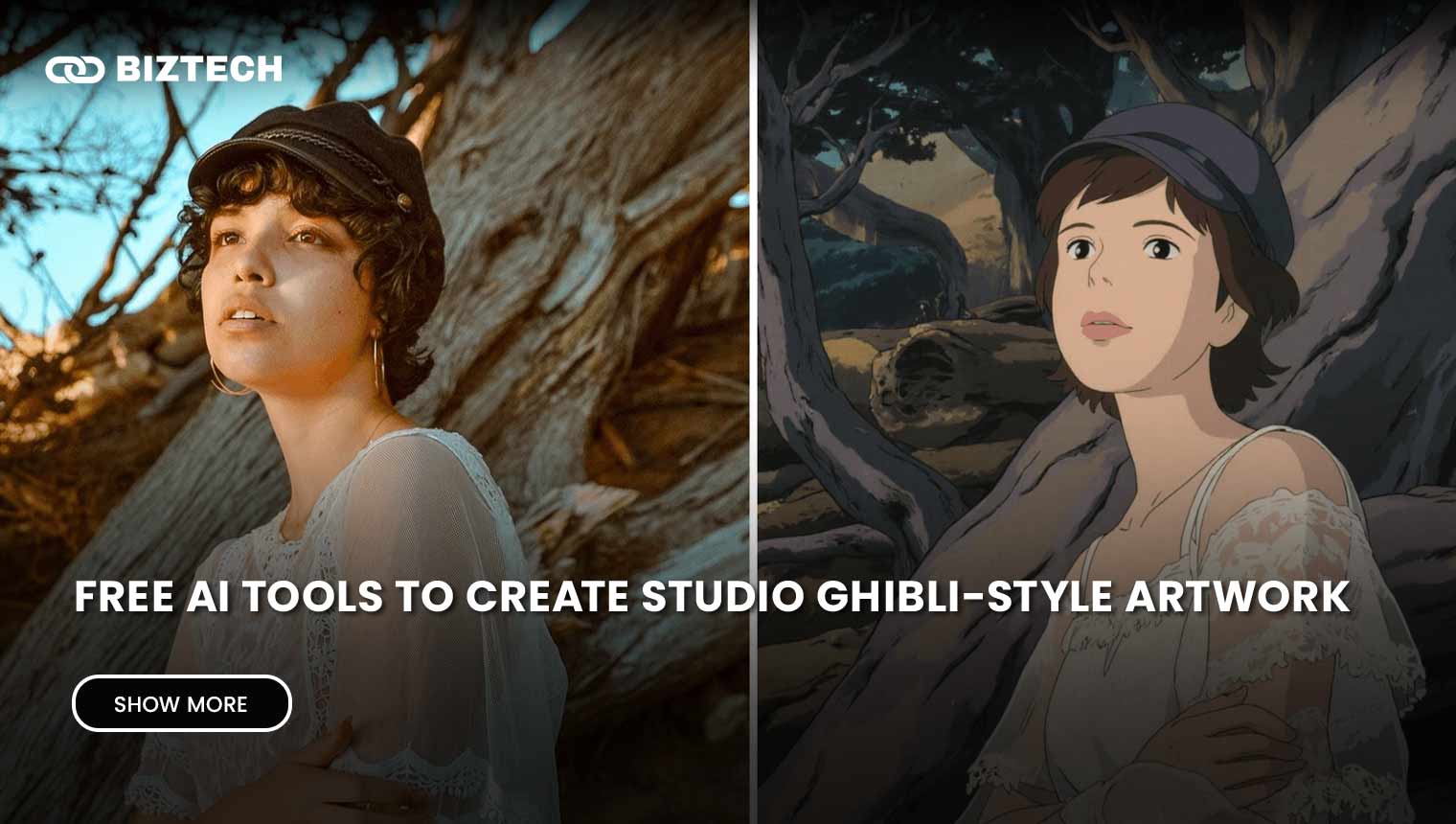
When OpenAI switched on image generation inside ChatGPT in late March 2025, the internet turned itself into a Studio Ghibli movie almost overnight. Selfies, wedding photos, pets and even news screenshots were “Ghibli-fied” into soft, hand-painted scenes reminiscent of Spirited Away and My Neighbor Totoro. More than a year on, the trend has settled into a genuinely useful workflow—and the list of free AI tools to create Studio Ghibli-style artwork is longer, better and (in a few cases) more restricted than it was at launch.
This guide covers the tools that still work in 2026, what each free tier actually gives you, how to get a result that looks hand-drawn rather than plastic, and the privacy and copyright issues you should understand before you upload a single photo. Everything here was verified in July 2026; AI pricing and limits change fast, so confirm the current terms on each provider’s own page before you rely on them.
What “Ghibli-Style” AI Art Actually Is
It helps to set expectations first. No free tool gives you real Studio Ghibli animation—that is decades of hand-drawn cels, watercolour backgrounds and a specific creative team. What these tools reproduce is the look: soft pastel palettes, painterly skies, rounded character features and warm, nostalgic lighting. In practice you are doing one of two things:
Style transfer (photo in, stylised photo out)—you upload a picture and the model repaints it in a Ghibli-like style while keeping the composition. This is what made the March 2025 trend explode. Text-to-image—you describe a scene (“a quiet Malaysian kampung at golden hour, hand-painted anime style”) and the model invents it from scratch. Most of the tools below can do both. If you want to go deeper on general image tools, our roundup of the best AI image generators is a good companion read.
The Best Free AI Tools for Ghibli-Style Art in 2026
1. ChatGPT (GPT-4o / GPT Image) — where the trend started
OpenAI’s built-in image generator—the “4o image generation” model, now usually referred to as GPT Image—remains the benchmark for Ghibli-style style transfer. Its strength is that it understands your photo: it keeps faces recognisable, renders text correctly and lets you refine the result conversationally (“make the sky warmer, add a small spirit creature”). Upload a photo and prompt something like “Turn this into a Studio Ghibli-style animated scene, soft watercolour background.”
On the free plan you get roughly two to three images per rolling 24-hour window before you hit a limit—enough to test, not enough for a big batch. ChatGPT Plus (about US$20/month) raises the cap substantially and speeds up generation. See our guide to the best ChatGPT apps for the full plan breakdown.
2. Google Gemini (Nano Banana) — the strongest free challenger
Google’s image generation inside the Gemini app—nicknamed Nano Banana (built on Gemini 2.5 Flash Image), with a higher-quality Nano Banana Pro tier—has become the tool to beat for free users. It handles anime and Ghibli-style prompts well, edits images conversationally, and in mid-2026 Google made its personalised image generation free for a wider audience. Open the Gemini app, choose “Create images,” and upload a photo or type a scene. Heavier use and the Pro model sit behind Google AI Pro/Ultra, but the free tier is generous for casual Ghibli portraits. Official details are on Google’s image-generation page.
3. Fotor Studio Ghibli Filter — one-click, no prompting
If you don’t want to write prompts at all, Fotor‘s web-based Studio Ghibli filter is the easiest route. Upload a photo, pick a Ghibli style preset, and it repaints it automatically. It’s free to use, though high-resolution downloads without a watermark generally need a paid plan, and popular filters can queue during peak traffic. Good for a quick avatar; less flexible than ChatGPT or Gemini.
4. Dedicated web Ghibli generators (Pixelbin, insMind, getimg.ai)
A cluster of purpose-built “photo to Ghibli” web apps appeared during the trend and many are still running. Pixelbin offers a no-login, no-watermark Ghibli generator with a small monthly free allowance (around three images). insMind lets you download standard-quality Ghibli images free, with HD and watermark removal on its Pro tier. getimg.ai hosts the open-source Ghibli Diffusion model (a Stable Diffusion fine-tune originally shared on Hugging Face by community developer IShallRiseAgain) and gives new users free starter credits. These are handy when you just want a quick result without signing into a big AI platform—but read the fine print on how they store your photos.
5. Grok (Aurora) — no longer a free option
xAI’s Grok, powered by its Aurora image model (and the newer Grok Imagine), was free when the Ghibli craze began and produced fast, decent results. By 2026, however, xAI moved higher-quality image and video generation behind paid SuperGrok plans (from roughly US$10/month), with free access heavily limited and changing often. If you already pay for X Premium or SuperGrok it’s worth a try; if you specifically want a free tool, start with the options above and check Grok’s current terms before assuming access.
Also worth a look
Canva‘s Magic Media / Dream Lab can produce anime and Ghibli-style images from prompts within its free plan’s monthly credit allowance—convenient if you’re already designing there. And for those comfortable with open-source, running Ghibli Diffusion or a similar model locally via Stable Diffusion is completely free and private, at the cost of some setup. For adjacent creative tools, see our picks for free AI selfie generators and creating AI artwork with Midjourney.
Free Ghibli AI Tools Compared (2026)
| Tool | Free tier | Login needed? | Watermark on free? | Best for |
|---|---|---|---|---|
| ChatGPT (GPT Image) | ~2–3 images / 24h | Yes | No | Best likeness & conversational edits |
| Google Gemini (Nano Banana) | Daily free limit | Yes (Google acct) | No (SynthID label) | Strongest free all-rounder |
| Fotor | Free with limits | Optional | Often, on HD | One-click, no prompting |
| Pixelbin | ~3 images / month | No | No | Quick, no sign-up |
| insMind | Standard-quality free | Optional | On free HD | Simple photo-to-Ghibli |
| getimg.ai (Ghibli Diffusion) | Starter credits | Yes | No | Open-source model fans |
| Grok (Aurora) | Very limited / paid | Yes (X acct) | — | Existing SuperGrok users |
Free limits and features verified July 2026 and change frequently—confirm on each provider’s own page.
How to Choose the Right Tool
Match the tool to the job rather than chasing whichever is trending this week:
You want your face to stay recognisable → ChatGPT (GPT Image) or Gemini, which preserve likeness best. You want zero effort → Fotor or insMind’s one-click filter. You don’t want to create an account → Pixelbin. You want full control and privacy → run an open-source Ghibli model locally. You need many images → a paid tier (ChatGPT Plus or Google AI Pro) will be cheaper on your patience than fighting free daily caps.
How to Get a Result That Actually Looks Ghibli
The difference between a magical result and an obvious AI mess is usually the prompt and the source photo. A few things that work:
Start from a clear, well-lit photo with a simple background—busy scenes confuse the model. Name the mood, not just the studio: “soft watercolour lighting, warm nostalgic palette, gentle hand-drawn linework, pastoral background.” Add a setting your audience will recognise—“a rice paddy at sunset,” “a Penang shophouse street”—so the image feels grounded rather than generic. Then iterate: with ChatGPT or Gemini you can say “warmer sky,” “less saturated,” “add a small forest spirit” until it lands.
Worked example: upload a family photo taken outdoors, then prompt “Repaint this in a Studio Ghibli-inspired style: soft pastel colours, painterly clouds, warm afternoon light, keep everyone’s faces recognisable.” Generate, then refine one element at a time. Two or three passes usually beats a single elaborate prompt.
Common Pitfalls to Avoid
Your photo is biometric data. Uploading a selfie hands over your facial structure and expressions. Reputable platforms (OpenAI, Google) have clear policies, but many small “free Ghibli” sites do not—some bury perpetual, royalty-free rights to your images in their terms, meaning your photo could be reused to train models or in marketing. Prefer well-known providers, avoid uploading photos of children, and skip apps that demand social-login or unnecessary permissions.
Fake and copycat apps. App stores filled with “Ghibli AI” clones during the trend. Some are wrappers that charge aggressive weekly subscriptions or are outright scams. Check the developer, reviews and price before installing.
Watermarks and hidden limits. “Free” often means free preview, watermarked download, or a tiny daily cap. Confirm what you actually get to keep. Note that Google labels its AI images with an invisible SynthID watermark for provenance—that’s a transparency feature, not a usage restriction.
Expecting perfection. AI still fumbles hands, small text and complex group photos. Treat the output as a starting point you may need to regenerate or lightly edit.
The Copyright and Ethics Debate
The Ghibli trend reignited a hard question: is copying a studio’s style fair game? Broadly, artistic style itself isn’t protected by copyright—but the data used to train these models, and outputs that reproduce protected characters, are contested. In November 2025 Japan’s Content Overseas Distribution Association (CODA), which represents Studio Ghibli and other major publishers, formally asked OpenAI to stop using its members’ work for AI training without permission, warning that legal action could follow. The issue remains a legal grey area as courts weigh whether training on copyrighted films is fair use (background: TechCrunch coverage).
There’s an ethical layer too. Studio Ghibli co-founder Hayao Miyazaki is frequently quoted calling AI animation “an insult to life itself.” It’s worth being accurate: that remark comes from a 2016 NHK documentary, where he reacted to a specific, grotesque AI motion demo—not the 2025 ChatGPT trend. His broader point, that art needs human feeling and effort, is real, but the quote is often stripped of its original context. A fair takeaway: enjoy these tools for personal, transformative fun, credit human artists, and don’t pass AI work off as an official studio product or sell it commercially without understanding the risk. If you’d rather explore AI you own outright, Adobe Firefly is trained on licensed and public-domain content and markets its output as commercially safer.
Ghibli-Style AI in Malaysia & Singapore
The good news for MY/SG readers: the strongest free tools—ChatGPT, Gemini, Fotor and the web generators—all work regionally without a VPN, though some Google features roll out to certain countries first, so a specific “personalised” option may lag. Paid upgrades (ChatGPT Plus, Google AI Pro) are billed in US dollars, so expect foreign-exchange fees and, where applicable, Malaysia’s 8% Sales & Service Tax or Singapore’s 9% GST on top of the sticker price.
On privacy, both countries have data-protection law—Malaysia’s PDPA (with 2024–2025 amendments tightening breach and consent rules) and Singapore’s PDPA—but enforcement against an overseas AI app is difficult in practice. The safest posture is the same everywhere: use reputable platforms, avoid uploading photos of other people (especially children) without consent, and don’t feed sensitive images to unknown “free” sites. If you’re curating AI apps on your phone, our list of the best AI apps for iPhone flags which ones are trustworthy.
Frequently Asked Questions
Prices, free limits and availability were verified in July 2026 and can change without notice—always confirm the current details on each provider’s official page before subscribing or uploading.
Disclaimer: This article is provided by KayaToday for general informational purposes only and does not constitute legal advice. Copyright and privacy rules around AI-generated art are evolving; if you plan to use Ghibli-style images commercially, consult the relevant platform’s terms and a qualified professional. KayaToday is not affiliated with Studio Ghibli, OpenAI, Google or any tool mentioned.