Introduction
Midjourney remains one of the most popular AI art generators in 2026 — and it has changed dramatically since it first went viral. You no longer need Discord to use it, the latest V8.1 model generates sharp 2K images in seconds, and the same subscription now creates short videos too. This updated guide walks you through everything: how Midjourney works today, how to sign up and create your first artwork on the web, how much it costs, and the prompting techniques that separate average results from stunning ones.
- Introduction
- What is Midjourney?
- What’s Changed: Midjourney in 2026
- Getting Started with Midjourney (Web — the Easy Way)
- Step 1: Create an account at midjourney.com
- Step 2: Pick a subscription plan
- Step 3: Type your first prompt in the Imagine bar
- Step 4: Refine — vary, upscale, edit
- Step 5: Organize, download, and share
- Midjourney Pricing in 2026
- Writing Better Prompts: A Simple Framework
- Still Prefer Discord? It Works Too
- Turning Images into Videos
- Tips for Using Midjourney
- 1. Be Concise
- 2. Use Styles and Mediums
- 3. Combine Concepts
- 4. Use Lighting for More Dynamic Output
- 5. Iterate in Draft Mode, Finish in HD
- Common Pitfalls to Avoid
- Midjourney for Malaysia & Singapore Users
- Final Thoughts on Midjourney
- Frequently Asked Questions (FAQs)
What is Midjourney?
Midjourney is a subscription-based AI image (and video) generator that turns text prompts into detailed, artistic visuals. You describe what you want to see — “a kampung house at golden hour, watercolor style” — and Midjourney’s diffusion model generates four image options in under a minute. From there you can upscale, create variations, edit specific regions, match a reference style, or even animate the result into a short video clip.
Compared with rivals like GPT Image, Google Gemini, and Adobe Firefly, Midjourney is best known for its distinctive aesthetic quality — painterly lighting, strong composition, and coherent styles — which is why designers, marketers, authors, and content creators use it for book covers, brand visuals, social media graphics, concept art, and blog imagery. If you want to compare it against other tools first, see our guide to the best AI image generators.
What’s Changed: Midjourney in 2026
If you last touched Midjourney in the Discord-bot era, here is what’s different now:
| Then (2022–2023) | Now (2026) |
|---|---|
| Discord required; type /imagine commands to a bot | Full web app at midjourney.com — type prompts in the Imagine bar; Discord is optional |
| V4/V5 models | V8.1 is the default model (since June 2026) — HD 2K images by default, much faster and cheaper per image |
| 25 free trial images | No free trial — paid plans only (from US$10/month) |
| Images only | Image-to-video generation (SD/HD), with unlimited relax-mode SD video on Pro/Mega plans |
| Basic upscale/variation buttons | Web Editor with inpainting brush, zoom out, pan; Draft Mode for rapid ideation |
| One-size-fits-all output | Personalization profiles, moodboards, Style References, and Omni Reference for consistent characters |
V8.1 also brought back community favourites like image prompts and image weights, added a Prompt Shortener, and renders text in quotation marks far more accurately — useful for posters, labels, and signage.
Getting Started with Midjourney (Web — the Easy Way)
The fastest way to start in 2026 is the website — no Discord account needed.
Step 1: Create an account at midjourney.com
Go to midjourney.com and click Log In. You can sign in with a Google account or a Discord account. That’s it — no server invites, no bot channels.
Step 2: Pick a subscription plan
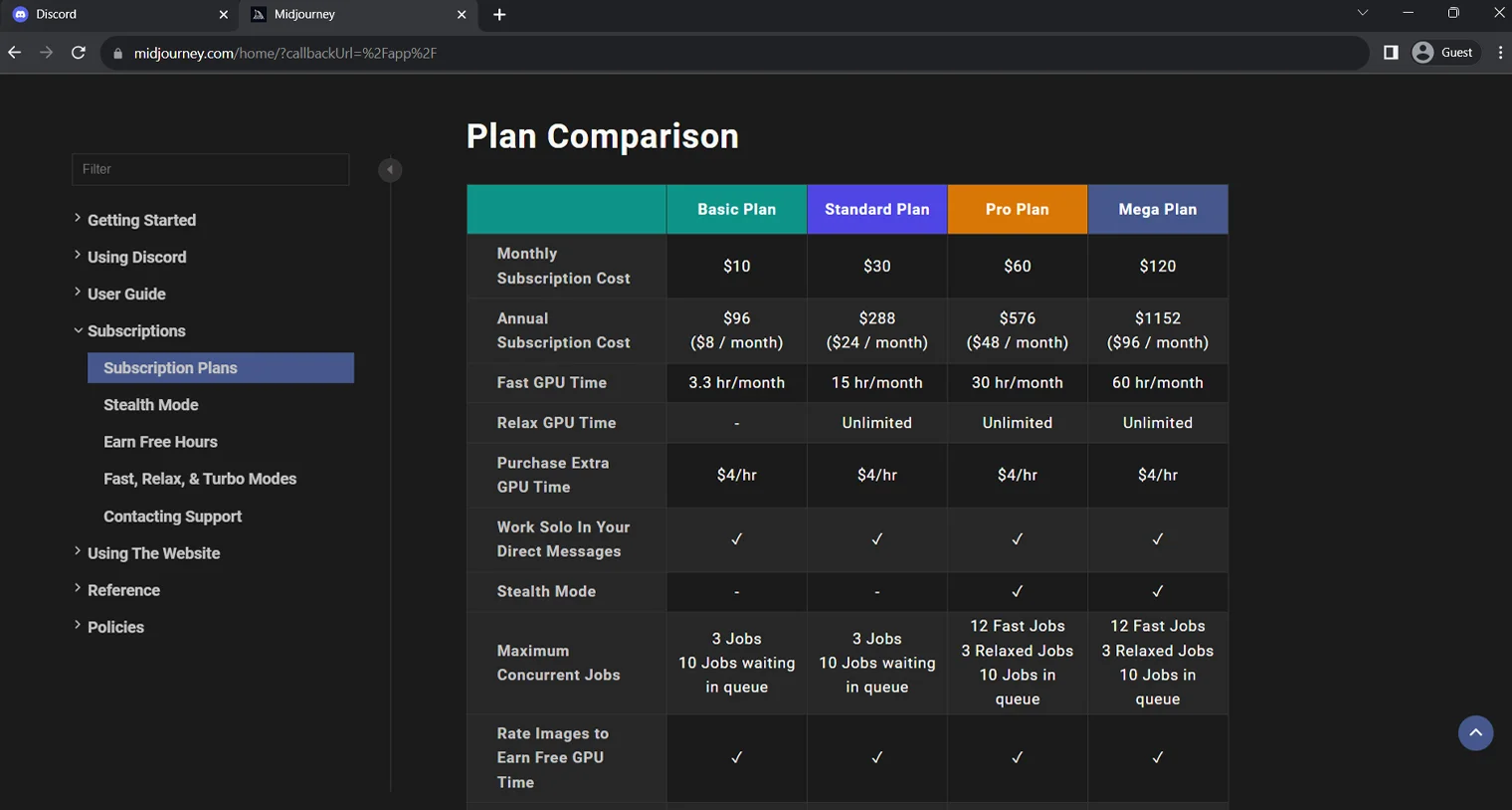
Midjourney has no free tier, so you’ll be prompted to subscribe before generating. There are four plans (see the pricing table below). The Basic plan (US$10/month) gives you roughly 200 image generations a month — plenty for learning. The Standard plan (US$30/month) adds unlimited images in Relax Mode, which is the sweet spot for regular creators. Payment is by credit/debit card via Stripe, and you can upgrade, downgrade, or cancel anytime from your account page.
Step 3: Type your first prompt in the Imagine bar
Open the Create page. At the top you’ll see the Imagine bar — just describe what you want and press Enter. For example: “a vast starlit sky over a rice paddy, crescent moon, cinematic lighting”. Midjourney generates four options in well under a minute on V8.1. No /imagine command needed on the web.
Step 4: Refine — vary, upscale, edit
Click any of the four images to open it, then use Vary Subtle/Strong to explore alternatives, Upscale for a larger file, or the Editor to brush over and regenerate specific areas (change an outfit, remove an object, extend the canvas with zoom-out or pan). V8.1’s “Run as HD” button re-runs any standard job at high resolution.
Step 5: Organize, download, and share
Everything you make lands on your Organize page, where you can filter, sort into folders, and batch-download. Note that on Basic and Standard plans your images are publicly visible on the Midjourney community feed — Stealth Mode (private generation) requires Pro or Mega.
Midjourney Pricing in 2026
Official pricing as of July 2026 (all USD; annual billing saves 20%):
| Plan | Monthly | Annual (per month) | Fast GPU time | Relax Mode | Stealth Mode |
|---|---|---|---|---|---|
| Basic | US$10 | US$8 | 3.3 hr/month (~200 images) | No | No |
| Standard | US$30 | US$24 | 15 hr/month | Unlimited images | No |
| Pro | US$60 | US$48 | 30 hr/month | Unlimited images & SD video | Yes |
| Mega | US$120 | US$96 | 60 hr/month | Unlimited images & SD video | Yes |
All plans can buy extra fast GPU time at US$4/hour, and all include general commercial usage rights — except companies earning more than US$1 million a year, which must be on Pro or Mega. Full details are on the official Midjourney plan comparison.
Writing Better Prompts: A Simple Framework
Prompting is where stunning artwork is actually made. A reliable structure is:
Subject + descriptive details + medium/style + lighting + composition + parameters
For example: “an elderly batik artist in her workshop, hands stained with indigo dye, oil painting style, warm window light, close-up portrait –ar 4:5”
Useful controls you can add at the end of a prompt or via the settings icon in the Imagine bar:
| Control | What it does |
|---|---|
| –ar (aspect ratio) | Shape of the image, e.g. –ar 16:9 for banners, –ar 9:16 for TikTok/Reels |
| –sref (Style Reference) | Paste an image URL to match its look and colour palette |
| Omni Reference | Keep the same character, product, or object consistent across many images |
| –stylize | How strongly Midjourney applies its own aesthetic (lower = more literal) |
| Raw mode | Less opinionated, more photographic results |
| Draft Mode | Rapid, cheaper generations for brainstorming before committing to HD |
| “Text in quotes” | V8.1 renders quoted text accurately — great for posters and product labels |
You can also create moodboards (upload images of a style you love) and a Personalization profile so Midjourney learns your taste over time. If you like these reference-driven workflows, Adobe’s rival tool works similarly — see our Adobe Firefly guide.
Still Prefer Discord? It Works Too
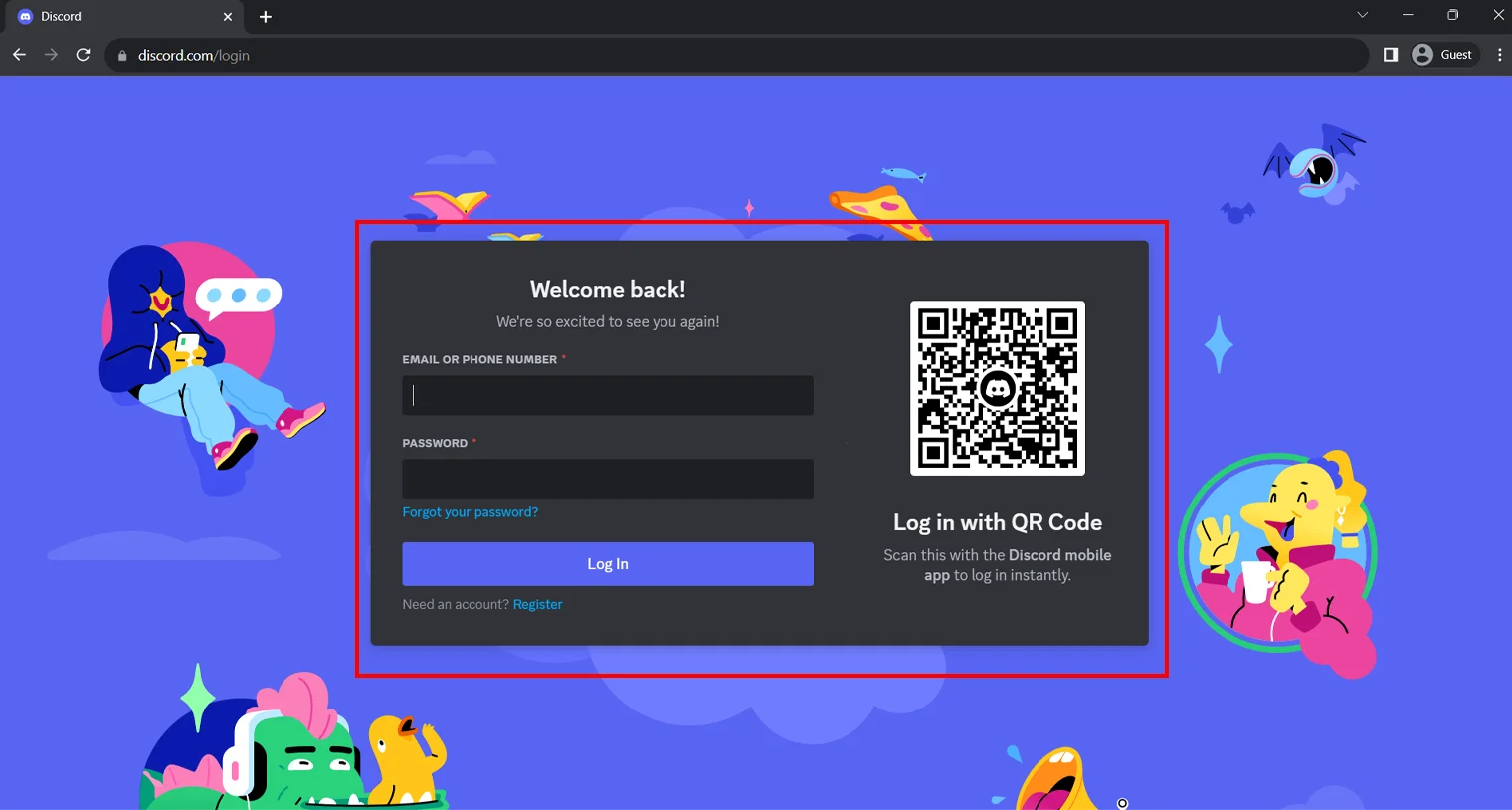
Discord is no longer required, but the Midjourney bot still lives there and some long-time users prefer it. The classic flow (note: the screenshots in this section show the older interface):
Join the official server at discord.gg/midjourney, subscribe via /subscribe or midjourney.com/account, then generate in a #newbie channel or by messaging the bot directly.
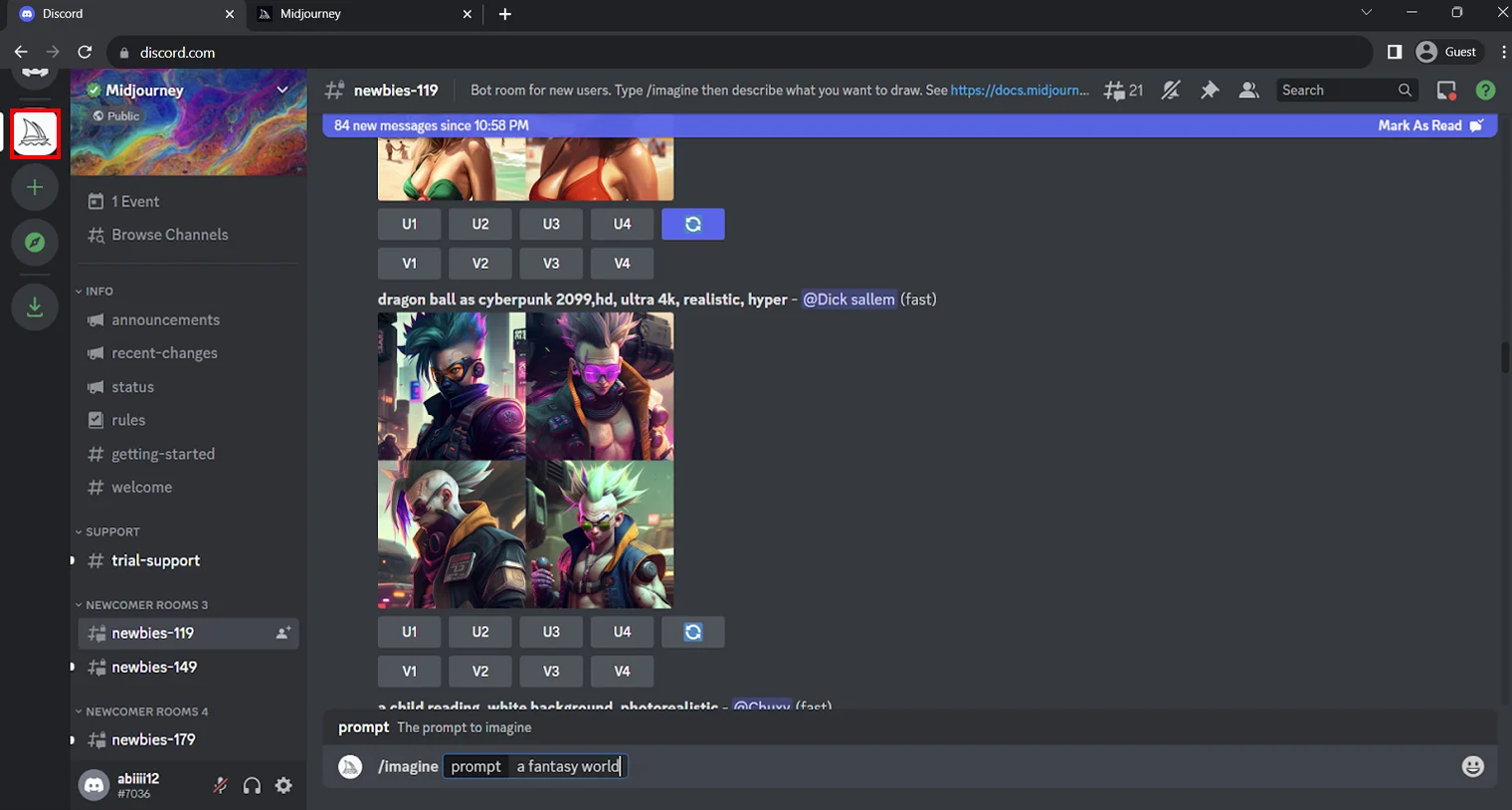
Use /imagine followed by your prompt. The U buttons upscale one of the four images; the V buttons create variations of it.
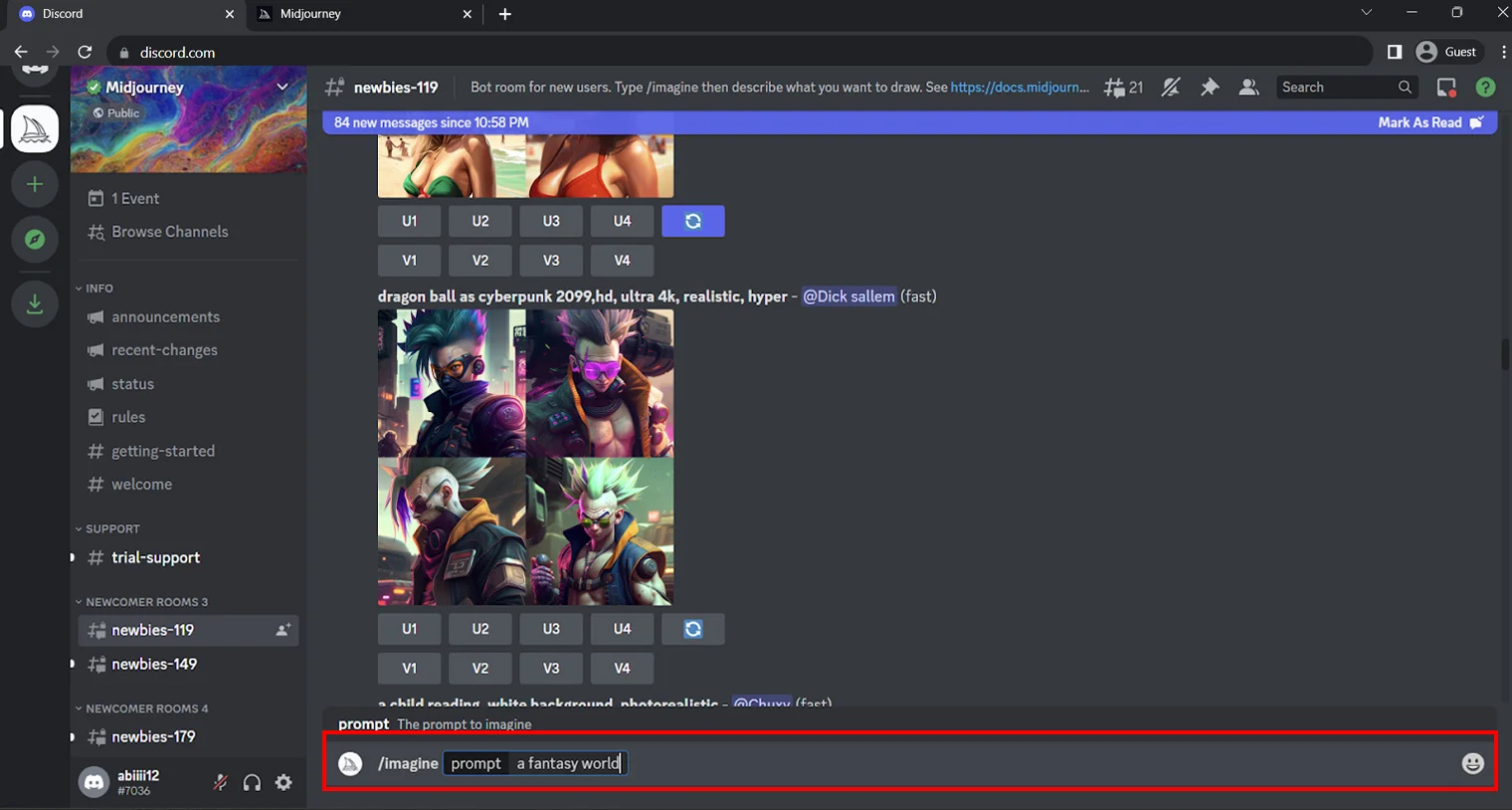
Refine by editing your prompt — swap “a girl in a dress” for “a girl in a flowing, red summer dress”, name an artistic style, describe the lighting, or add a reference image URL.
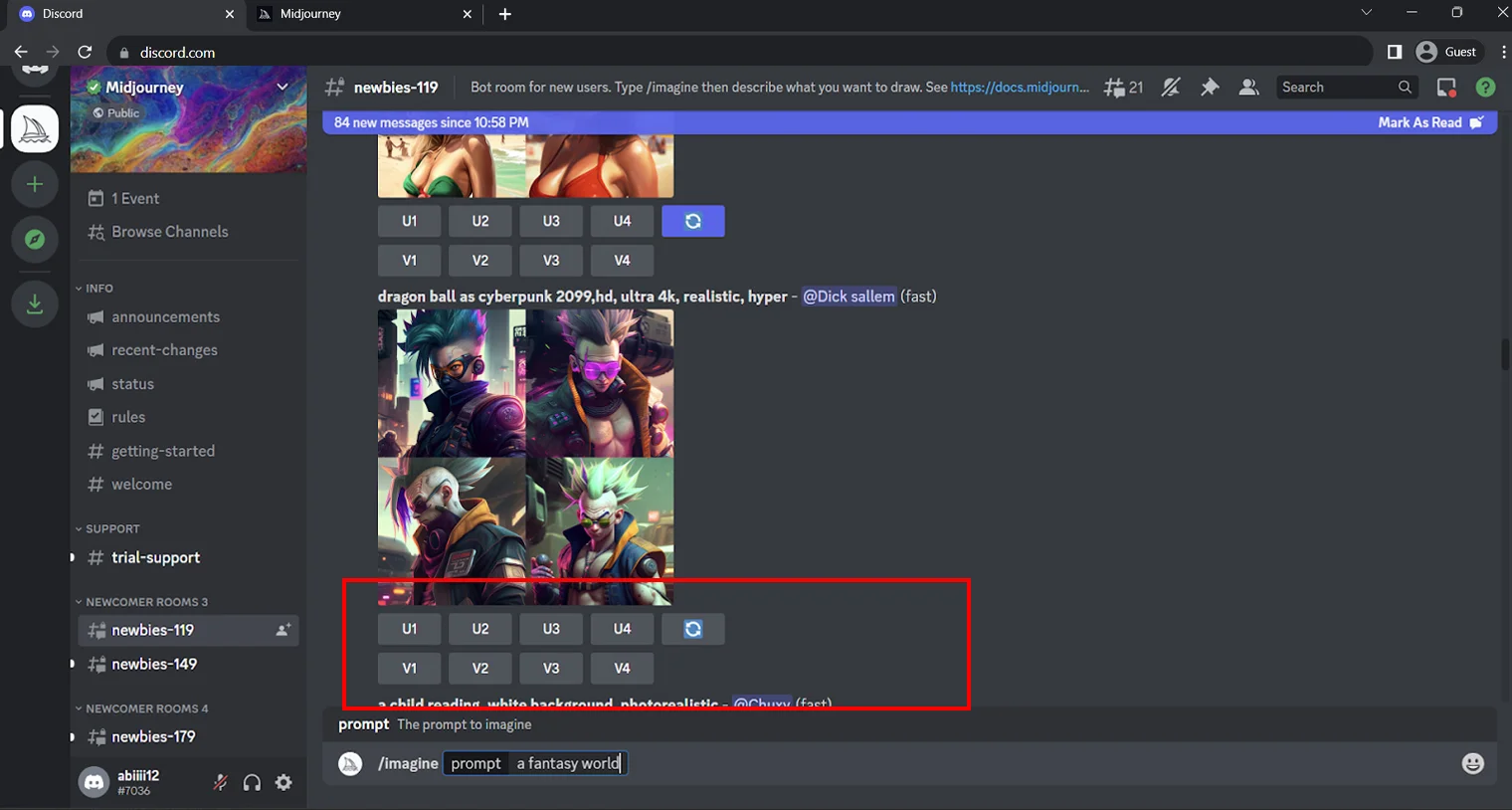
Everything you generate on Discord also appears on your midjourney.com Organize page, so you can mix and match both interfaces freely.
Turning Images into Videos
Since mid-2025, Midjourney can animate any image — its own generations or one you upload as a starting frame — into short video clips. Choose SD or HD resolution (HD video is available on Standard plans and above; unlimited relax-mode SD video needs Pro or Mega). It’s a genuinely fun way to bring artwork to life for Reels, TikTok, and story posts. For dedicated video tools with longer clips and editing features, compare our picks for the best AI video generators.
Tips for Using Midjourney
1. Be Concise
Less is frequently more. Short, specific prompts produce more consistent results than rambling narratives — Midjourney responds to clear visual descriptions, not storytelling. V8.1 even includes a Prompt Shortener that trims over-long prompts automatically, which tells you something about what the model actually needs.
2. Use Styles and Mediums
Name a medium (“watercolor”, “pencil sketch”, “35mm film photo”, “isometric 3D render”) and an aesthetic to steer the output dramatically. Better still, use a Style Reference or moodboard instead of naming a living artist — it gives you the same control with fewer copyright headaches. Trend styles work too; see our guide to Ghibli-style AI art tools.
3. Combine Concepts
Midjourney excels at fusing incongruous ideas into coherent images — an underwater city, a cyberpunk kampung, a durian-shaped spaceship. Unexpected combinations are where the most original artwork comes from, and the Blend feature lets you merge multiple images directly.
4. Use Lighting for More Dynamic Output
Lighting language transforms results: “golden hour”, “soft diffused overcast light”, “dramatic rim lighting”, “neon glow”. Specifying light direction and mood adds depth and makes images look intentional rather than generic.
5. Iterate in Draft Mode, Finish in HD
A cost-saving workflow: brainstorm compositions in fast, cheap Draft Mode, then re-run only your favourite with “Run as HD”. You’ll stretch your monthly GPU hours much further than generating everything at full quality.
Common Pitfalls to Avoid
“Free Midjourney” apps are fakes. Midjourney has no free tier and no official mobile app for image generation — third-party apps and websites claiming free Midjourney access are reselling something else or harvesting your data. If you want genuinely free AI art, use Google Gemini or the free tiers in our free AI image tools roundup.
Your images are public by default. On Basic and Standard plans, everything you generate appears in the community feed. Don’t prototype confidential client work or unreleased products without Stealth Mode (Pro/Mega).
Watch the commercial-use fine print. Subscribers can use their images commercially, but companies with over US$1 million in annual gross revenue must be on Pro or Mega. Also note that purely AI-generated images generally cannot be registered for copyright in many jurisdictions, and AI copyright litigation against image generators is still working through the courts — avoid building a brand identity you can’t legally defend on AI output alone. Logos in particular deserve care; see our AI logo builder guide for trademark-safe workflows.
HD and video burn GPU hours fast. Upscales, HD generations, and video consume far more fast GPU time than standard images. If you keep running out mid-month, switch exploration to Relax Mode (Standard and above) rather than buying US$4/hr top-ups.
Midjourney for Malaysia & Singapore Users
Midjourney bills in USD, so the Basic plan works out to roughly RM45–48/month in Malaysia or about S$13–14/month in Singapore at mid-2026 exchange rates, before any card FX fees. Factor in Malaysia’s 8% service tax on imported digital services and Singapore’s 9% GST where applied. There is no local pricing or student discount, so the annual plan (20% off) is the main way to save. Local creators use Midjourney heavily for Shopee/Lazada product lifestyle shots, Raya and CNY campaign visuals, cafe menus, and event posters — just remember the public-feed caveat above before generating client work, and check that AI-generated imagery complies with your client’s brand and advertising guidelines.
Final Thoughts on Midjourney
Midjourney in 2026 is faster, easier, and far more capable than the Discord bot that made it famous. The web app removes the setup friction, V8.1 delivers HD-quality images at speed, and features like Style References, Omni Reference, the Editor, and video generation give you real creative control without traditional drawing or painting skills. It isn’t free, and it isn’t the right tool for every job — but for distinctive, art-directed visuals, it remains the benchmark that other generators are measured against. Start on Basic, learn the prompting framework above, and upgrade only when Relax Mode or Stealth Mode actually earns its keep.
Prices and features verified July 2026 — Midjourney updates its models and plans frequently, so confirm current details with the provider before subscribing.
Read also: Free AI Tools to Create Studio Ghibli-Style Artwork
Frequently Asked Questions (FAQs)
Disclaimer: This article is for general information only. KayaToday is not affiliated with Midjourney, and pricing, features, and terms may change without notice. Always verify current details on the provider’s official website before purchasing.