File Your Taxes the Easy Way with LHDN e-Filing (2026 Guide)
If you earn income in Malaysia, filing your annual return through LHDN’s MyTax portal is now almost entirely digital — no queues, no paper forms. This guide walks you step by step through e-Filing for Year of Assessment 2025 (the income you earned in 2025, which you file in 2026), with the current deadlines, what’s new this year, and how to claim every relief you’re entitled to.
- File Your Taxes the Easy Way with LHDN e-Filing (2026 Guide)
- Quick Answer: e-Filing at a Glance (YA 2025)
- 2026 Filing Deadlines You Must Know
- What’s New for e-Filing in 2026
- Fully digital first-time PIN (e-KYC)
- One Tax Identification Number (TIN)
- 2% tax on high dividend income
- Before You Start: What to Have Ready
- How to Apply for Digital Tax Filing
- Step 1: Log In to MyTax
- Step 2: Start e-Filing
- Step 3: Check and Update Your Details
- Step 4: Add Further Information
- Step 5: Provide Your Income Details
- Step 6: Claim Your Tax Reliefs (YA 2025)
- Reliefs vs deductions vs rebates — what’s the difference?
- Step 7: Check Your Summary
- Step 8: Sign and Submit
- How to Choose: Which Form and When to File
- Common e-Filing Mistakes to Avoid
- Frequently Asked Questions
- File Early, File Right
The good news: for YA 2025, LHDN opened the e-Filing system on 1 March 2026, and refunds for early filers began landing from the second week of March. The earlier you file, the earlier any refund reaches your bank account.
Quick Answer: e-Filing at a Glance (YA 2025)
| Question | Short answer |
|---|---|
| Where do I file? | MyTax portal at mytax.hasil.gov.my (or the MyTax mobile app) |
| When did filing open? | 1 March 2026 for YA 2025 |
| Deadline (employment income, Form BE) | 15 May 2026 via e-Filing |
| Deadline (business income, Form B) | 15 July 2026 via e-Filing |
| Do I need to file? | Generally yes if your annual income is about RM34,000 or more after EPF |
| How fast is a refund? | Around 30 working days for e-Filing (up to 90 for manual) |
| First-time PIN | Now obtainable digitally via e-KYC on the MyTax app — no branch visit needed |
2026 Filing Deadlines You Must Know
Each taxpayer type has its own form and deadline. e-Filing gives you a grace period over the manual paper deadline, which is one more reason to file online. Here are the dates for the YA 2025 season:
| Type of taxpayer | Form | e-Filing deadline (YA 2025) |
|---|---|---|
| Employer | E (e-E) | 31 March 2026 |
| Resident individual – employment income only | BE (e-BE) | 15 May 2026 |
| Resident individual – with business income | B (e-B) | 15 July 2026 |
| Partnerships | P (e-P) | 15 July 2026 |
| Non-resident individual | M (e-M) | 15 May 2026 (no business) / 15 July 2026 (with business) |
Filing after your deadline is treated as a late submission and can attract a penalty, so set a reminder. If you’re still unsure whether you even need to register, see our companion guide on how to register for income tax in Malaysia (MyTax).
What’s New for e-Filing in 2026
A few meaningful changes affect how you file and what you declare this year:
Fully digital first-time PIN (e-KYC)
Previously, first-time filers had to print a form and visit an LHDN branch to collect a PIN. From early 2026, you can apply for your first-time login PIN digitally through e-KYC on the MyTax app — scan your MyKad and take a selfie — or via e-CP55D using your registered email. For most people, the branch trip is now optional.
One Tax Identification Number (TIN)
LHDN has moved to a single TIN linked to your MyKad/identification number. Note that simply having a TIN does not automatically mean you can e-file — you still need to activate your digital certificate (first-time PIN) to submit a return.
2% tax on high dividend income
From YA 2025, a 2% tax applies to individual dividend income that exceeds RM100,000 a year (the first RM100,000 is exempt, and only the excess is taxed). Certain sources are excluded, such as EPF dividends and foreign-sourced dividends. As this is self-assessed, affected taxpayers must declare it in their return. If you hold shares or unit trusts, check whether this applies to you.
Before You Start: What to Have Ready
Filing is far faster when your documents are laid out first. Gather:
• Your EA form from your employer (shows your annual salary and the Monthly Tax Deduction / PCB already paid).
• Receipts for any tax reliefs you intend to claim (medical, lifestyle, education, insurance, SSPN, childcare, etc.).
• Donation receipts from LHDN-approved bodies if you plan to claim deductions.
• Your bank account details for any refund.
• Your MyTax login (ID number + password / digital certificate).
Under the Income Tax Act 1967 you must keep these supporting documents for seven years — LHDN can request them even after a refund is paid.
How to Apply for Digital Tax Filing
If you’ve never filed before, your first step is to register for a Tax ID (TIN) via e-Daftar at the MyTax portal, mytax.hasil.gov.my.
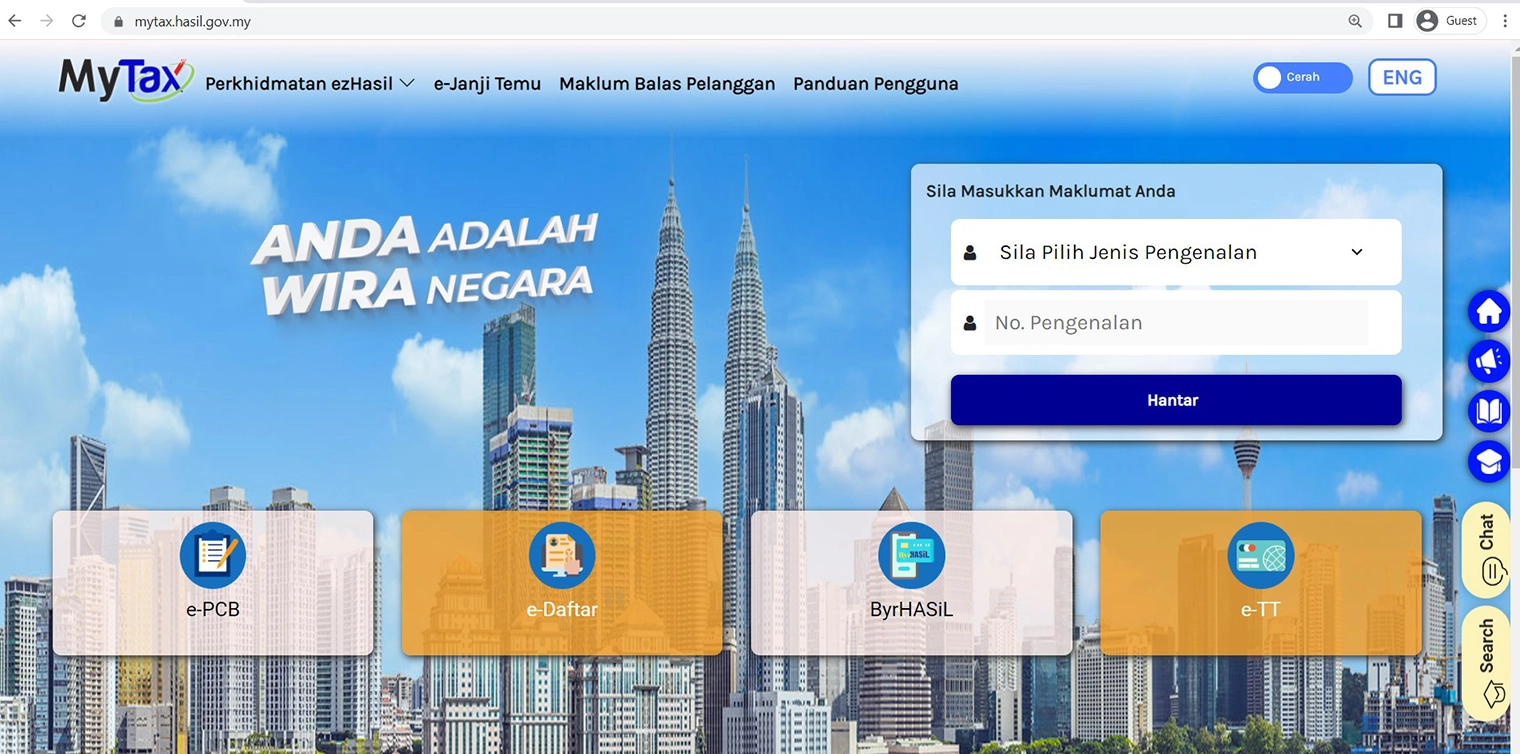
Complete the e-Daftar form to register for your Tax ID number.
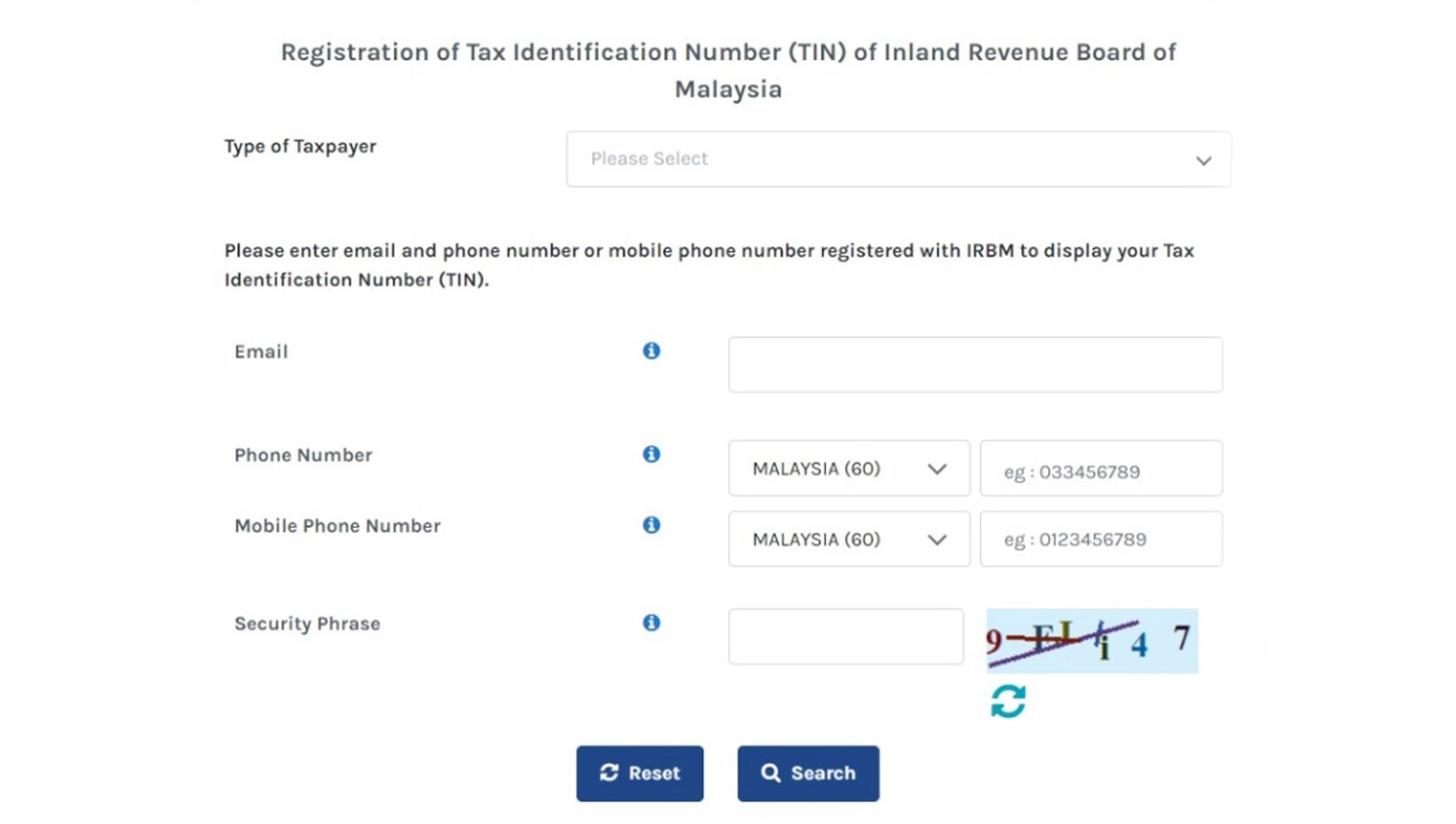
Select the correct taxpayer category, enter your preferred email and phone number, and complete the security check. Once registered, apply for your first-time PIN digitally through the MyTax app’s e-KYC feature — in 2026 you no longer need to visit a branch in most cases. After that, everything is online.
Step 1: Log In to MyTax
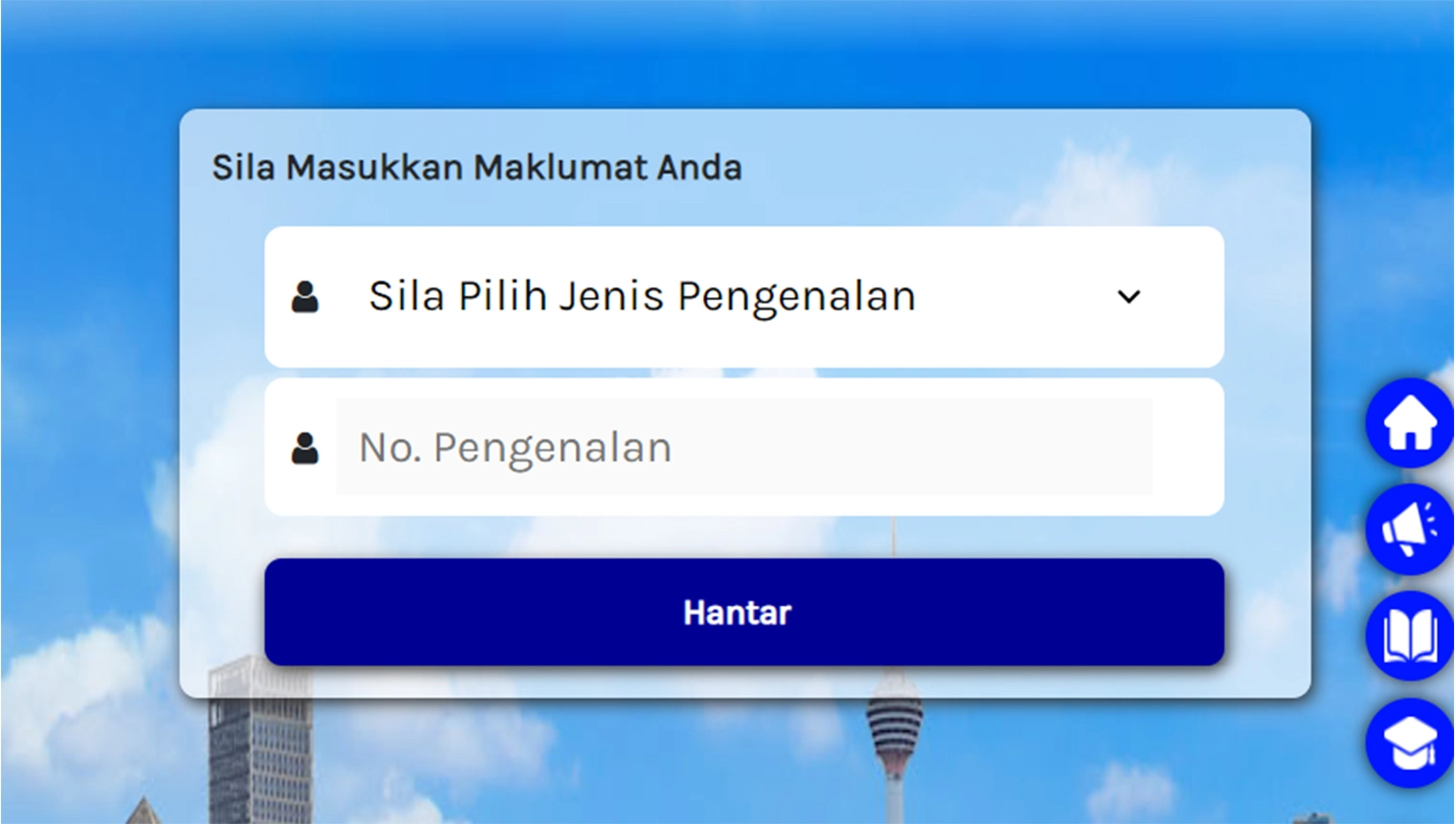
At the top-right of the MyTax homepage, choose your ID Type and enter your Identification Number, then your password.
Step 2: Start e-Filing

From the dashboard, open ezHasil Services and select e-Filing, then choose the income tax form for the correct Year of Assessment (YA 2025 for income earned in 2025). Most salaried individuals file the e-BE; those with business or freelance income file the e-B. Use the deadline table above to confirm which form applies to you.
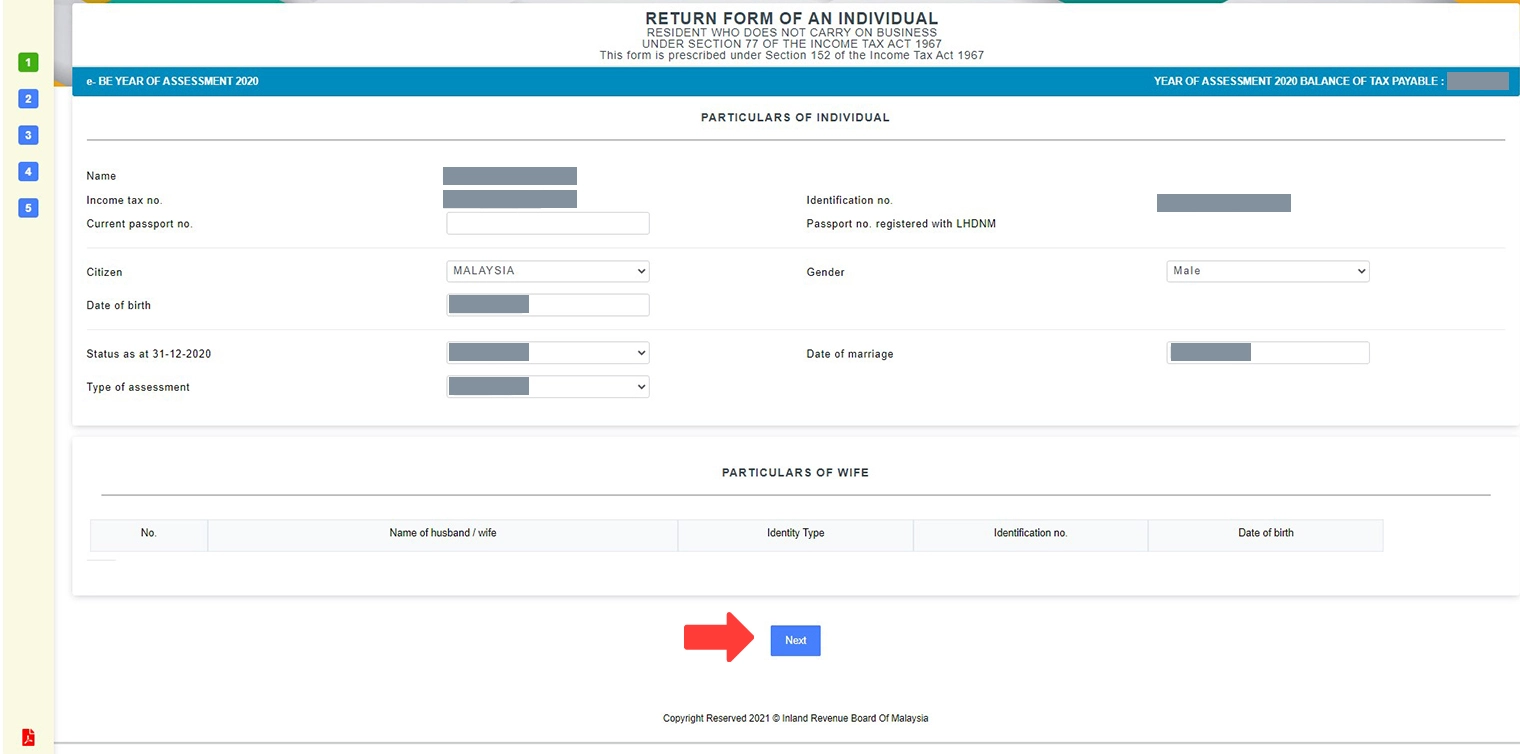
Step 3: Check and Update Your Details
Your personal particulars load on the next page. Confirm everything — bank account (for refunds), address, and contact details — is correct before moving on.
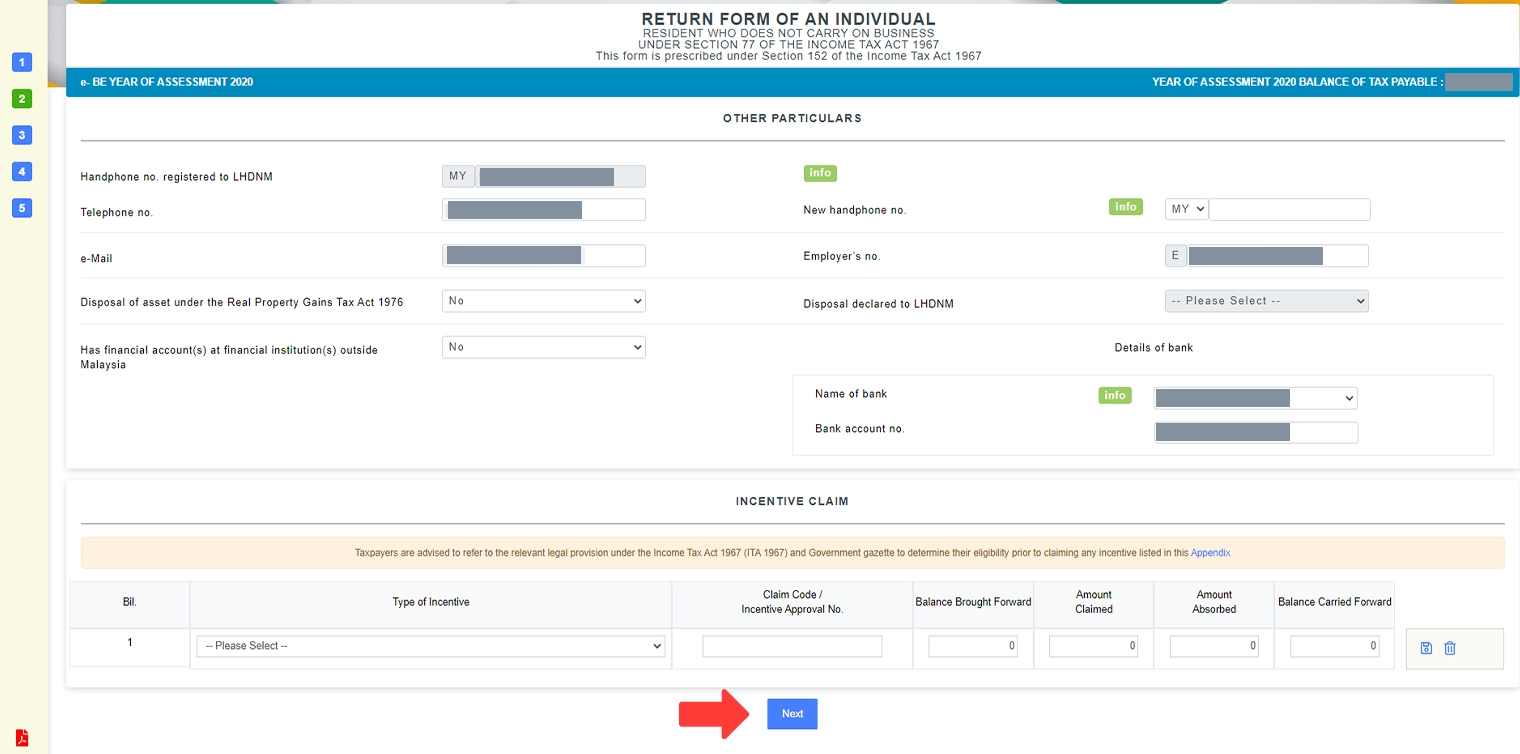
Step 4: Add Further Information
This section covers additional declarations — for example, whether you disposed of any taxable assets or received tax incentives. Complete what applies and continue.
Step 5: Provide Your Income Details
Enter your employment income exactly as shown on your EA form. Verify that the Monthly Tax Deduction (MTD/PCB) already paid matches your EA form — this is what often results in a refund if too much was deducted.
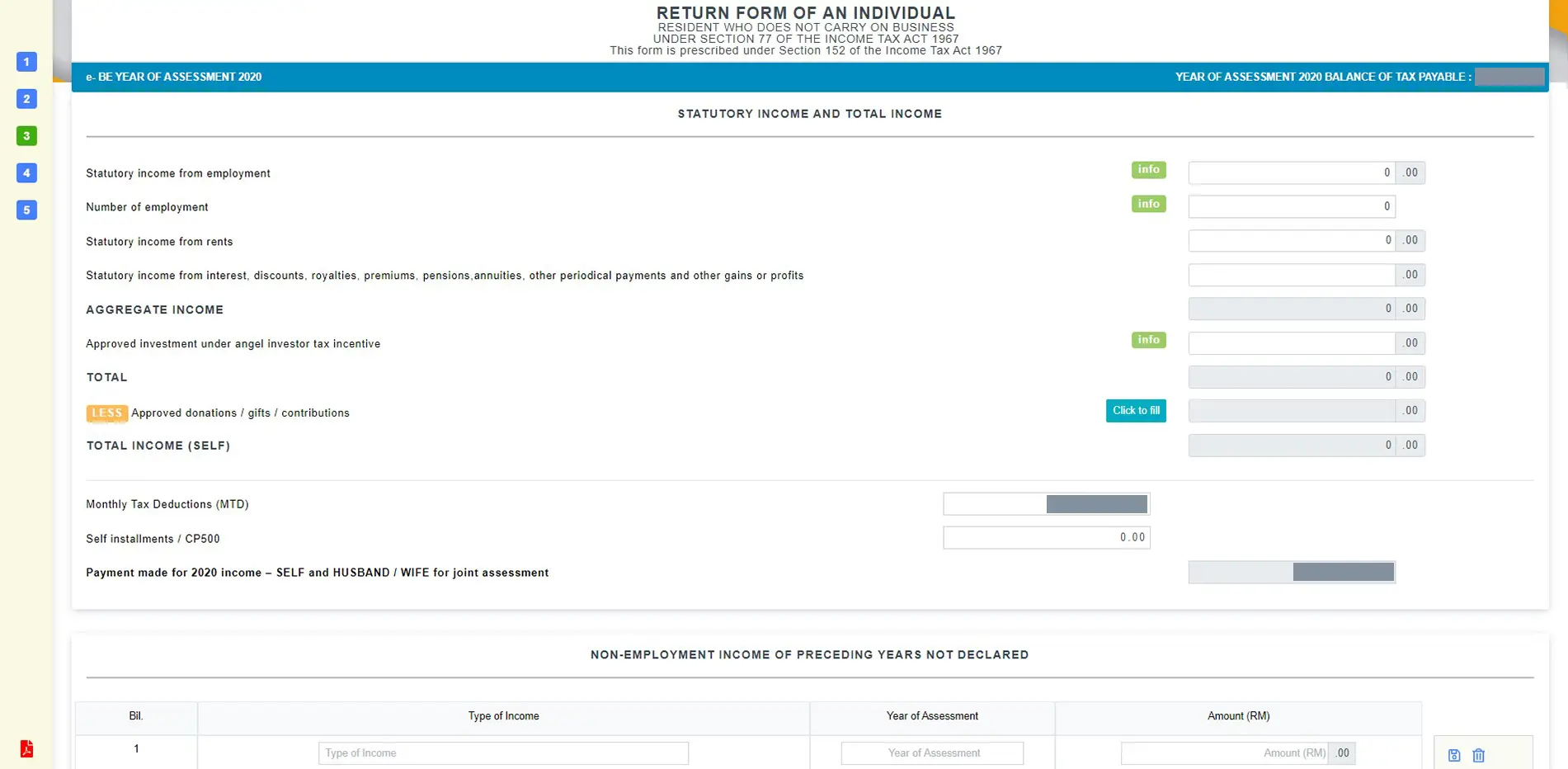
If you also earn freelance, rental, or dividend income, declare it here. Remember the new 2% dividend tax on individual dividend income above RM100,000 for YA 2025. You can also declare approved donations — see our guide to donation tax deductions in Malaysia for what qualifies and the 10% aggregate-income cap.
Step 6: Claim Your Tax Reliefs (YA 2025)
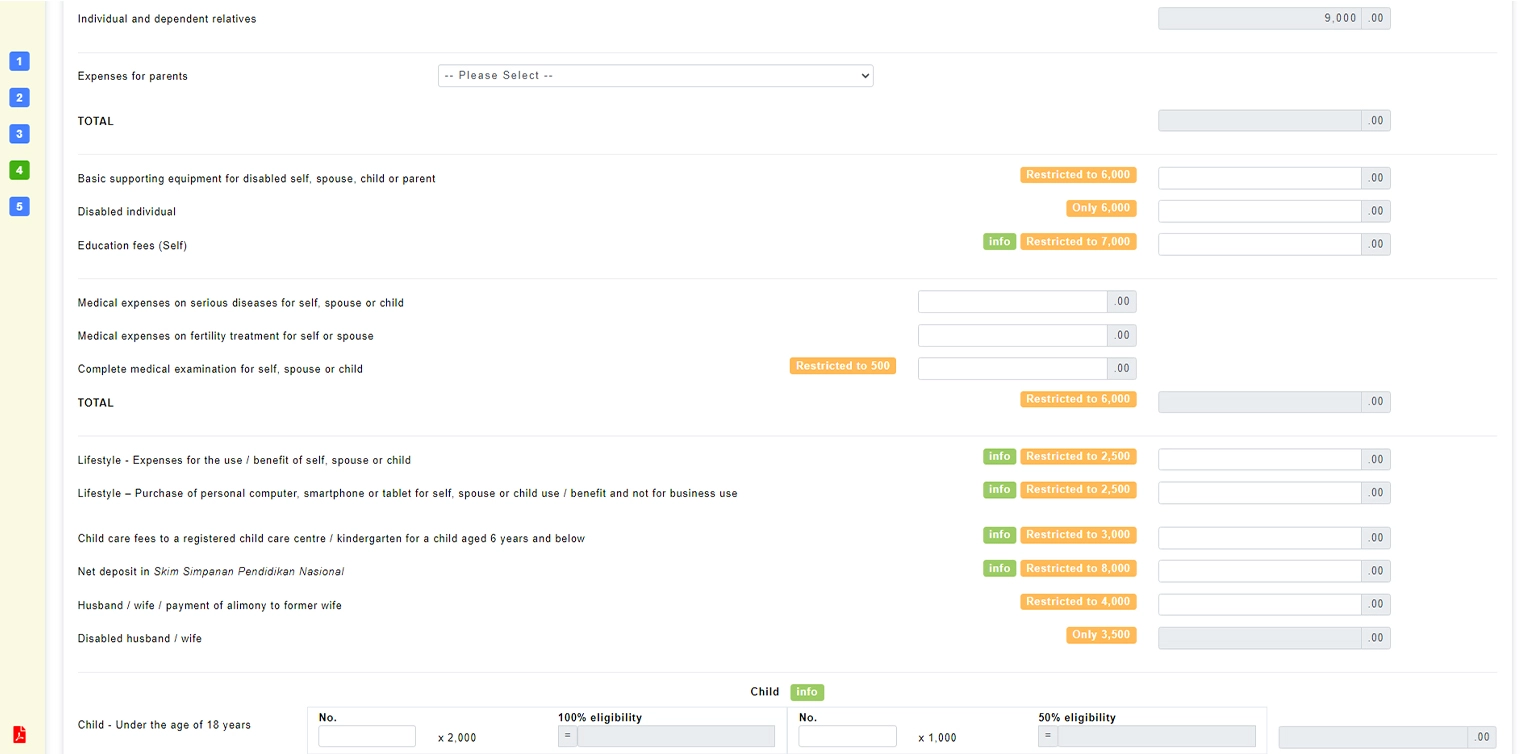
Tax reliefs reduce your chargeable income, which is what your tax is calculated on. This is where most of your savings come from — so go through every receipt carefully. Below is the list of individual reliefs for YA 2025, updated for this year’s changes.
| Relief | Maximum (RM) |
|---|---|
| Individual and dependent relatives | 9,000 |
| Disabled individual (self) | 7,000 |
| Husband / wife / alimony to former spouse | 4,000 |
| Disabled husband / wife | 6,000 |
| Education fees (self) – incl. RM2,000 sub-limit for upskilling | 7,000 |
| Housing loan interest, first home (SPA 2025–2027): up to RM500k | 7,000 |
| Housing loan interest, first home: RM500,001–RM750,000 | 5,000 |
| Medical expenses (self, spouse, child) – serious illness, fertility, vaccination, dental, check-up; sub-limits apply | 10,000 |
| Medical / care for parents & grandparents | 8,000 |
| Basic supporting equipment for disabled (self/spouse/child/parent) | 6,000 |
| Lifestyle – books, devices, internet, courses | 2,500 |
| Additional sports lifestyle – equipment, facilities, gym, competition fees | 1,000 |
| EV charging equipment / food-waste composting machine | 2,500 |
| Life insurance and EPF | 7,000 |
| Private Retirement Scheme (PRS) & deferred annuity (to YA 2030) | 3,000 |
| Education and medical insurance | 4,000 |
| SOCSO / EIS contributions | 350 |
| SSPN net savings (child’s education) | 8,000 |
| Each child below 18 | 2,000 |
| Each child 18+ in full-time higher education (diploma+ in MY / degree overseas) | 8,000 |
| Unmarried disabled child (+RM8,000 if in higher education) | 6,000 |
| Registered childcare centre / kindergarten (child 6 and below) | 3,000 |
| Breastfeeding equipment (once every 2 years) | 1,000 |
Key YA 2025 updates: the additional sports relief rose from RM500 to RM1,000; SSPN net-savings relief rose from RM6,000 to RM8,000; vaccination relief now covers all MOH-approved vaccines within the RM10,000 medical cap; and first-home loan interest relief was extended to homes priced up to RM750,000. Verified June 2026 against LHDN and PwC/RinggitPlus — always confirm the latest figures on the LHDN tax reliefs page.
For a deeper breakdown of exemptions versus reliefs, see our guide to tax exemptions in Malaysia.
Reliefs vs deductions vs rebates — what’s the difference?
It helps to know how each works: reliefs reduce your chargeable income (most everyday expenses); deductions reduce your aggregate income (mainly donations and professional membership fees); and rebates cut the final tax itself. A notable rebate: if your chargeable income is RM35,000 or below, you qualify for a RM400 personal rebate (plus another RM400 if you claim spouse relief). Zakat and fitrah paid are also rebates that directly reduce tax payable.
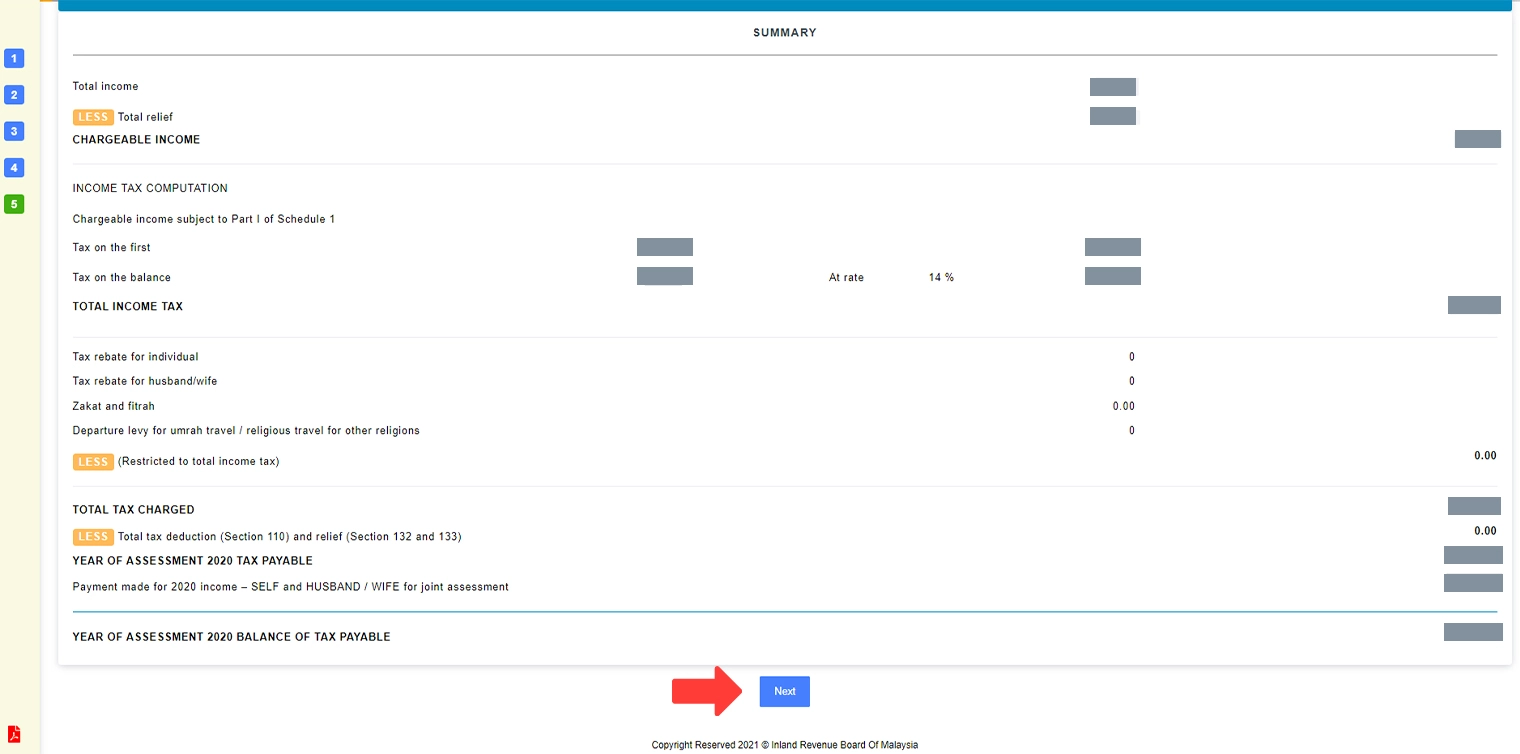
Step 7: Check Your Summary
MyTax automatically calculates your tax based on your income and reliefs. The final figure at the bottom shows whether you owe tax or are due a refund.
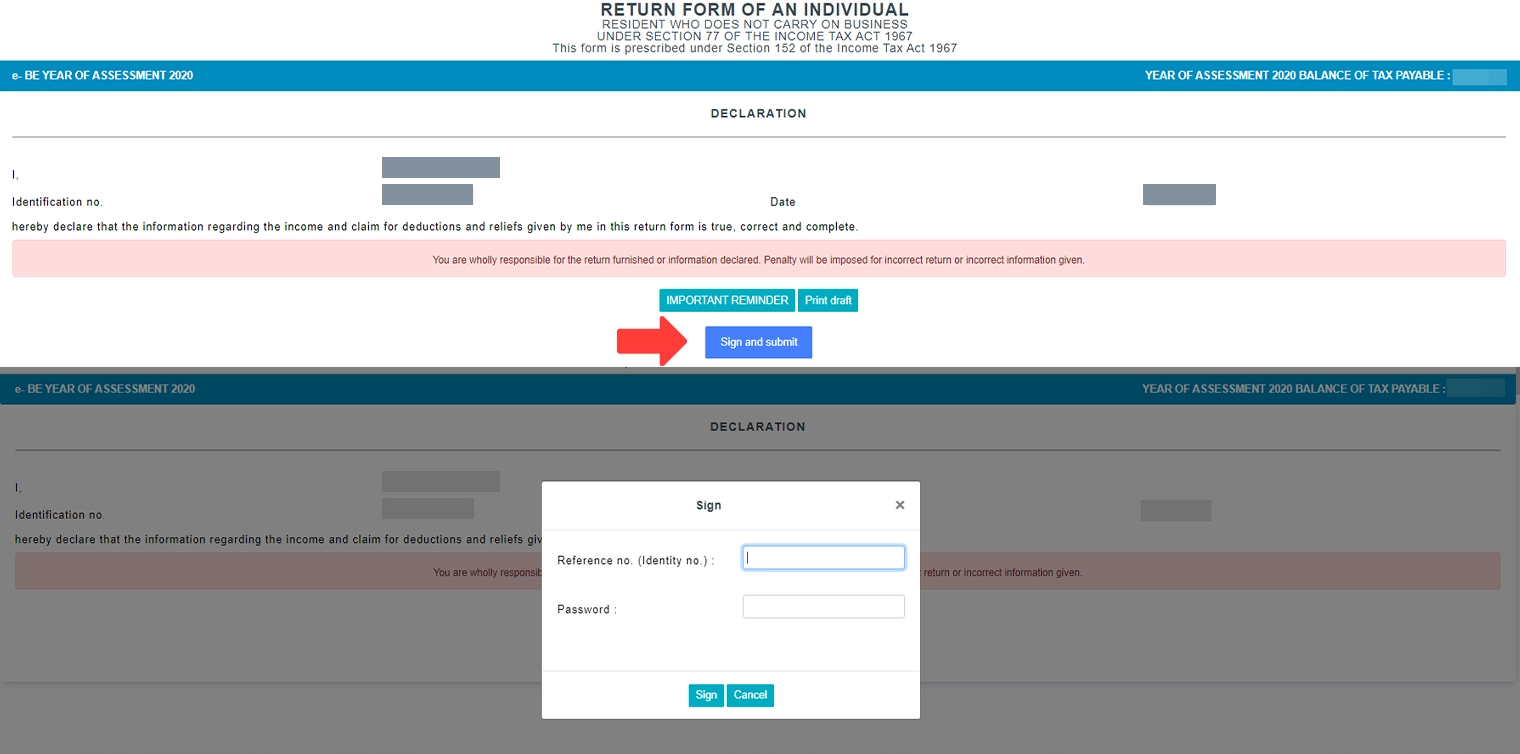
Step 8: Sign and Submit
The last step is the declaration that everything you’ve entered is true. Click Sign & Submit, re-enter your ID number and password to confirm, and you’re done. Save or print the acknowledgement for your records.
If you have a balance to pay, you can settle it via ByrHASiL (FPX, card, or e-wallet) within MyTax. If you’re owed a refund, it’s typically credited to your bank account within about 30 working days for e-Filing submissions.
How to Choose: Which Form and When to File
A simple framework if you’re unsure:
• Employment income only? File the e-BE by 15 May 2026.
• Any business, freelance, gig, or commission income? File the e-B by 15 July 2026.
• Expecting a refund? File early — refunds are processed in the order returns are received, and the system has been open since 1 March 2026.
• Have a balance to pay? You can still submit early and schedule payment up to the deadline, which helps with cash flow.
Common e-Filing Mistakes to Avoid
A few pitfalls trip people up every year:
• Double-claiming the same expense under two relief categories — for example, counting a smartphone under both lifestyle and another category.
• Forgetting the sports relief is separate from the RM2,500 lifestyle relief — that’s an extra RM1,000 many people miss.
• Claiming SSPN total deposits instead of net savings (deposits minus withdrawals in the same year).
• Not declaring side income — freelance, rental, and dividends must be reported.
• Wrong bank details, which delays your refund.
• Filing late — even one day past the deadline can trigger a penalty.
Made a mistake after submitting? You can apply to amend your return through MyTax or by contacting LHDN; act quickly and keep your supporting documents ready.
Frequently Asked Questions
File Early, File Right
e-Filing has turned what used to be a paperwork headache into a process you can finish in under an hour once your documents are ready. File early to get any refund sooner, claim every relief you’re entitled to, and keep your receipts for seven years. Taxes fund the roads, hospitals, schools, and services that keep Malaysia moving — filing accurately is both a legal duty and a small civic contribution.
While you’re sorting your finances, it’s a good time to review where your money sits — compare the best savings accounts in Malaysia and check your EPF dividend for the year.
Disclaimer: This guide is provided by KayaToday for general information only and reflects rules verified in June 2026 for Year of Assessment 2025. Tax rules, reliefs, and deadlines can change. Always confirm the latest details on the official LHDN/MyTax portal (mytax.hasil.gov.my) or with a licensed tax agent before filing. KayaToday is not a tax advisor.